Playing Japanese Games That Were Never Localized for You
The economics of game localization are brutal and simple: if your language’s player base doesn’t justify the cost, you don’t get a translation. Ever. Monster Strike has earned over $11 billion and never left Japanese. Umamusume: Pretty Derby ships in exactly two languages. Cygames has said outright that full multilingual localization isn’t financially viable — and Steam forums fill up with posts begging for Spanish anyway.
Fan communities patch the gap where they can, but mods like Hachimi Edge come with a familiar list of catches: PC and Android only, English only, broken by every game update, dependent on modified game files that can put your account at risk — and the original developer already discontinued it once.
There’s a way around the whole problem that doesn’t touch the game at all.
Translate the screen, not the game
PiP Translate puts a floating window over whatever you’re playing on iPhone or iPad. It reads the on-screen text with OCR and shows the translation in your language — 30+ of them, not just English. The game’s files are never modified; as far as the game knows, nothing is running. No sideloading, no patches to re-install after updates, no ban surface.
Since it works on pixels, it works on every game — including the ones no modder will ever touch.
 PiP Translate

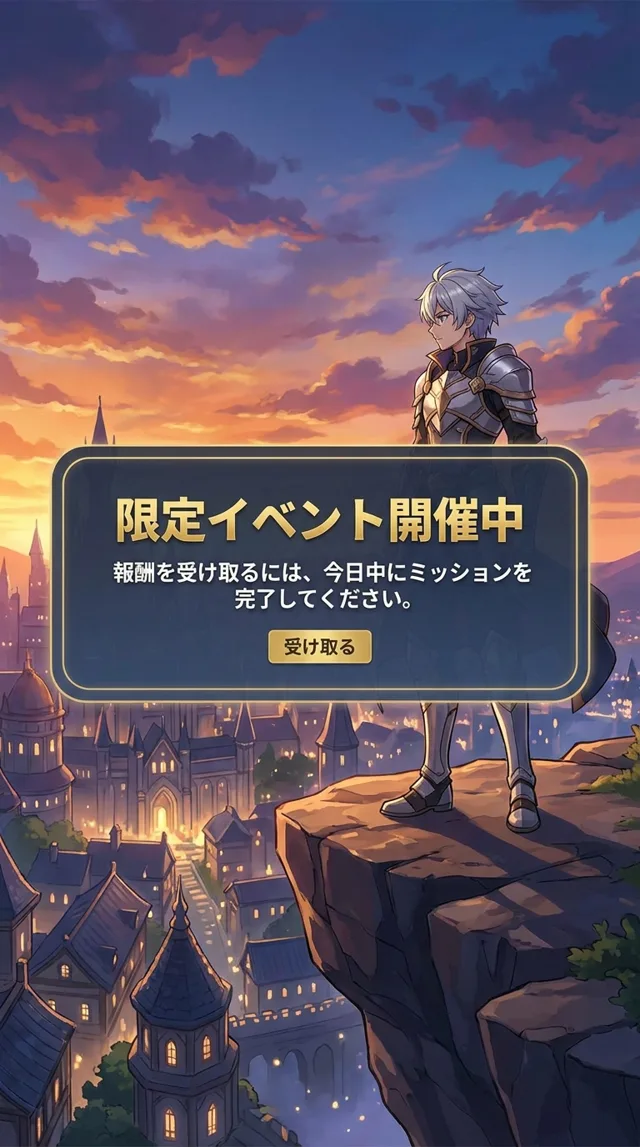
A limited event notice — deadline and reward readable before you tap
The Umamusume case
Umamusume is worth dwelling on because it’s one of the most text-dense games on mobile, and the text actually matters: training effects, skill activation conditions, and event choices decide your runs.
- Training menus — スピード and スタミナ resolve to Speed and Stamina, along with the detailed effect text under each option.
- Skills — hundreds of them, each with fiddly conditions. Read them in-game instead of alt-tabbing to a wiki.
- Story events — follow the plot and pick dialogue options on purpose rather than by superstition.
- Gacha and support cards — know what a card does before the gems are gone.
Repetition is the other reason gacha games suit this approach: the same menus and skill names recur endlessly, and PiP Translate caches every translation it makes. First encounter goes to the cloud; every repeat loads from cache in a few milliseconds. One heavy Umamusume player accumulated a 40,000-entry cache with an 87% hit rate — seven of eight text regions appearing instantly. The longer you play, the faster it gets.
Which games this unlocks
Japan-only, no official way in: Monster Strike, Dragon Quest Walk, the JP server of Puzzle & Dragons with its exclusive collabs.
English exists, your language doesn’t: Umamusume, Granblue Fantasy, Project Sekai, Blue Archive — fine if you read English, a wall if you’re a Spanish, Russian, Arabic, or Turkish speaker.
Localized, but not for everyone: Genshin Impact and Honkai: Star Rail cover many languages but not all; FGO players on the JP server get content a year early and pay for it in kanji.
Setup, in the time it takes to load a gacha banner
- Install PiP Translate from the App Store
- Open your game, start a translation session
- Pick your target language
- Play — translations appear as text does
The window floats in picture-in-picture: resize it, drag it out of the way, or pin it along the bottom like subtitles. Portrait and landscape both work.
The publishers aren’t coming to save you — the market math that skipped your language a decade ago hasn’t changed. The screen in front of you is translatable today.
Download PiP Translate and open the game you gave up on.