Idealista in English on iPhone: How to Read Spanish and Portuguese Rental Listings Before You Commit
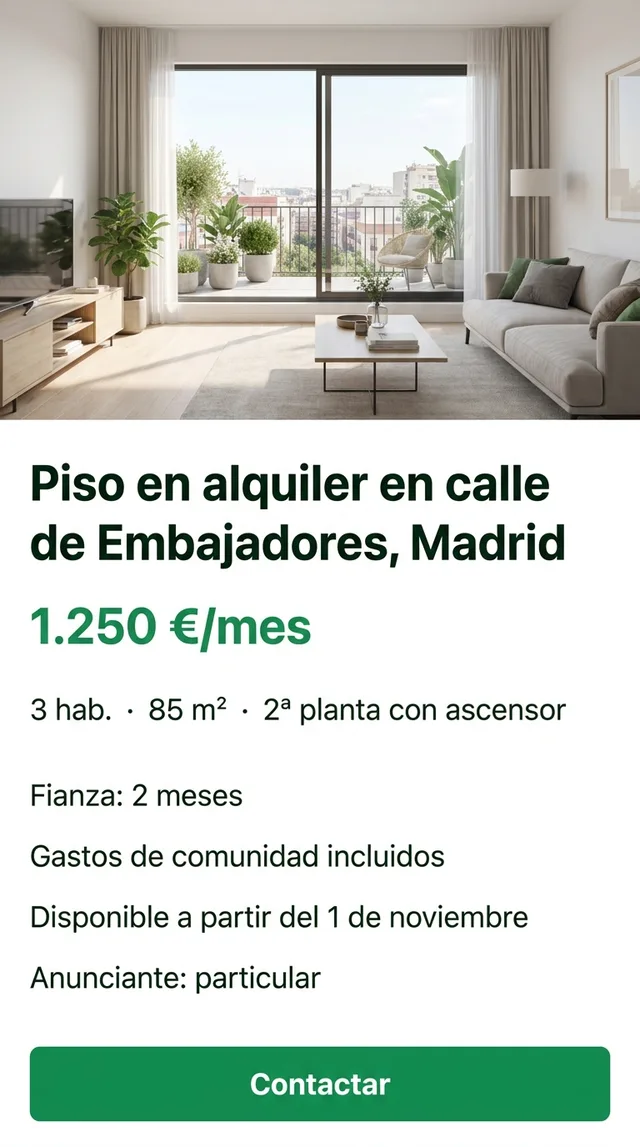
You’ve found a flat in Madrid. The photos look right, the price fits, the street is near the metro. Then you open the description and it’s a block of Spanish: fianza de dos meses, gastos de comunidad incluidos, particular, disponible a partir del 1 de noviembre. If you’re searching for Idealista in English, this is usually the moment you’re in: the site speaks English, but the flat doesn’t.
That gap matters more than on a shopping app. Renting in Spain or Portugal means reading costs, conditions and messages that decide what you pay every month and what you get back when you leave.
Idealista in English: what the switch actually covers
Start with the built-in option, because it exists. Idealista runs sites in Spain, Portugal and Italy, and the interface offers English. Look for the language option in the app or your account settings; apps move these things around, so check rather than assume. The iOS per-app Language row (Settings, then the app) is worth a look too.
With English on, you get English menus, filters, search fields and most fixed labels. What stays in the original language is everything a person typed:
- the listing description written by the landlord or agency
- messages and replies from advertisers
- photos of floor plans, building notices and contract pages
- the free-text notes about deposits, fees and conditions
So Idealista Spain in English is really English navigation around Spanish content. The same goes for Idealista Portugal in English, with Portuguese instead. For other portals, such as Fotocasa in English, check the app’s settings for a language option; the listings will be in Spanish regardless.
When the English switch isn’t enough
For the typed-by-a-human parts there’s screen translation. PiP Translate (on the App Store as PiP Screen Translate) works like this: you start an iOS screen broadcast from the app, switch to Idealista, and a Picture in Picture window floats on top showing the same screen with the text in English. Scroll the description, swipe through the photos, open the message thread; the window follows along.
Drag it to a corner, pinch to resize it, or swipe it off the edge when it covers the Contact button. The listing underneath is untouched. Set Spanish (or Portuguese, or Italian) as the source language instead of Auto: a wrong guess returns the text untranslated.
 PiP Translate
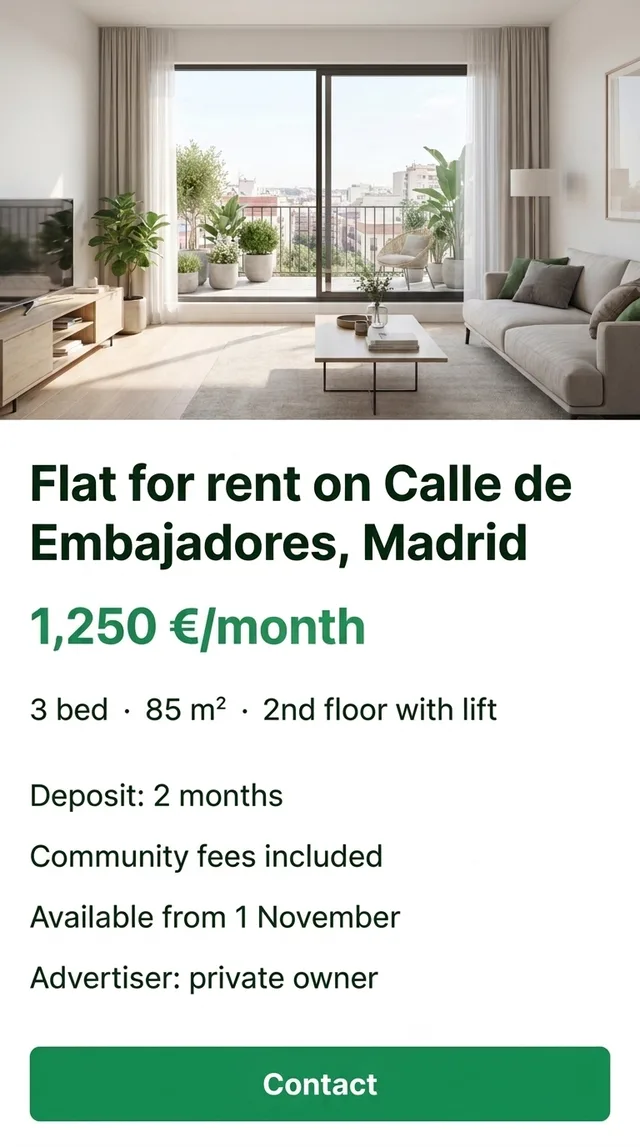
A Spanish rental listing for a flat on calle de Embajadores underneath, the same listing in English in the floating window
Text recognition runs on the phone, and only the recognized text goes out for translation. Because it reads what’s visible, it also handles text inside photos, such as a floor plan’s room labels or a notice pinned in the lobby. It’s free to download; unlimited translation needs a Pro subscription.
Reading a Spanish listing: the parts that decide the real cost
The headline price is the start. Before you message anyone, read the listing for these:
- What the rent includes. Are community fees in the price or on top? Are utilities mentioned at all?
- The deposit. How many months, and whether anything extra is asked for beyond it.
- Who is advertising. A private landlord or an agency, and whether any agency fee is mentioned and who pays it.
- Availability and minimum stay. The start date, and any note on minimum or maximum length of contract.
- The flat itself. Floor, lift, which way it faces, furnished or not, heating type.
A lot of this sits in the free-text description rather than the structured fields, which is exactly the part the English interface leaves in Spanish.
Renting in Spain: words worth recognising
A translation window renders these, but literal translations can mislead. Knowing them by sight speeds up browsing:
| On the listing | What it means for you |
|---|---|
| fianza | The deposit, returned at the end if the flat is in order |
| gastos de comunidad | Building/community fees for shared upkeep; check if included |
| particular | Private advertiser, not an agency |
| amueblado | Furnished |
| exterior / interior | Windows face the street / face an inner courtyard or light well |
| ático | Top-floor flat, often with a terrace |
| disponible a partir de | Available from (date) |
| T2 (Portugal) | Two-bedroom flat |
“Interior” is the one that surprises people: a perfectly nice-looking flat may get little direct light. Ask.
Idealista Portugal in English, and a note on Italy
Portuguese listings use their own shorthand. Flats are named by bedroom count: T0 is a studio, T1 one bedroom, T2 two, and so on. The deposit is the caução, and building fees are condomínio; as in Spain, check whether they’re included in the rent. Set Portuguese as the source language when you’re on the Portuguese site.
On the Italian site, the line to look for is spese condominiali, the building service charges that may sit on top of the rent. There’s more on Italian housing and admin apps in Italian apps in English.
Landlord messages, deposits and what translation can’t do
The message thread is where a floating window helps most. Landlords and agents reply in Spanish or Portuguese, often with conditions you didn’t see in the listing: documents they want, a viewing time, a question about your job or guarantor. Reading those without screenshotting each bubble saves a lot of back-and-forth.
It reads; it doesn’t write. You’ll compose replies yourself, and a short, polite message from any text translator is fine.
Housing is high stakes, so be clear about what a translation is for. It helps you understand the screen. It is not a reading of your contract. Before you commit:
- Confirm the deposit, rent, fees and contract terms with the landlord or agency in writing.
- Have the actual contract checked by a qualified person or someone who reads the language well before you sign.
- Don’t send money before you’ve seen the flat, in person or through someone you trust, and verified who the landlord is.
A few practical limits too. The translation trails the screen by a second or two, so scroll, pause, read. Tiny text in a floor plan photo comes out better if you zoom in first. Some banking and payment screens block screen capture, so you may see nothing to translate there.
The rest of the move
Renting is usually the first of many local-language apps: utilities, banking, the town hall, transport. The same session covers all of them, because it reads whatever is on screen. If you’re moving to study, see apps for international students; for how the floating window works in general, read translate your iPhone screen live.
PiP Translate is on the App Store. Read the whole listing, then ask the questions before you sign.
FAQ
Does Idealista have an English version?
Yes. Idealista's interface offers English on its Spanish, Portuguese and Italian sites; check the language option in the app or your account settings. The listings themselves are written by landlords and agents, so descriptions and messages usually stay in Spanish, Portuguese or Italian.
Can I use Idealista as a foreigner or from abroad?
Generally you can browse and contact advertisers from anywhere. Whether a landlord will rent to someone who hasn't seen the flat, or what paperwork they ask for, is up to them. Avoid sending money for a flat you haven't seen or a landlord you haven't verified.
How do I translate Idealista listings on iPhone?
Switch the interface to English first. For the parts that stay in Spanish or Portuguese, a screen translator such as PiP Screen Translate shows the same screen in English in a floating Picture in Picture window while you scroll the listing, photos and messages.
Does Fotocasa have an English version?
Check the app's language settings and the iOS per-app Language row. Either way, listings on Spanish property portals are typed by advertisers, so expect the descriptions to be in Spanish.