Subito in English on iPhone: How to Read Italian Classifieds, Seller Messages and Poste Italiane Screens
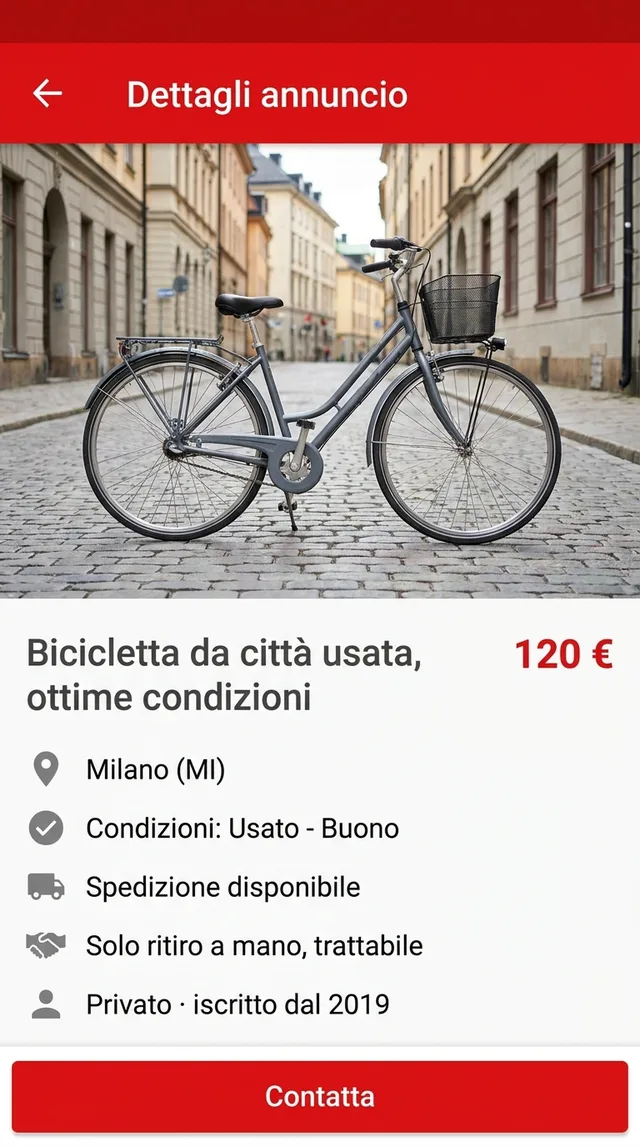
A used city bike in Milan for 120 €, “trattabile”, shipping available but “solo ritiro a mano” in the description, and a blue button that says Contatta. If you’re searching for Subito in English, that’s usually the screen in front of you: a good deal written entirely in Italian, and a seller who expects an answer in Italian.
At the time of writing, Subito is Italian only as far as we know. Listings, filters and chat are in Italian, and even if an English option appears later, sellers will keep writing in Italian. This guide covers what already exists, how to read a Subito listing on iPhone, the terms worth knowing, and the official apps (Poste Italiane, SPID, IO) where translation should only ever be a first step.
Subito in English: check what already exists
Three checks before you install anything:
- The app’s own settings. Look under your profile for a language option. We’re not aware of one, but apps change, so look rather than assume.
- The iOS per-app language. Open Settings, find Subito in the Apps list, and look for a Language row. It only appears when an app ships more than one language. No row means Italian only.
- The website in Safari. subito.it works in a browser, and Safari’s page translation handles Italian on normal pages. It does nothing inside the app, and it can’t read text inside photos.
This is true of a lot of Italian apps in English: the menus are the easy part. The listing text, the seller’s notes and the chat are whatever a person typed.
Read the listing in a floating window next to the app
PiP Translate (App Store name: PiP Screen Translate) covers the gaps. You start an iOS screen broadcast from the app, switch to Subito, and a Picture in Picture window shows the same screen in English. Scroll results, open a listing, read the description; the window follows. Drag it to a corner, pinch to resize it, or swipe it off the edge when it’s in the way.
It doesn’t touch Subito. The app underneath stays in Italian and the buttons you tap are still the Italian ones. Set Italian as the source language rather than leaving it on Auto: if detection guesses wrong, the text comes back untranslated.
 PiP Translate
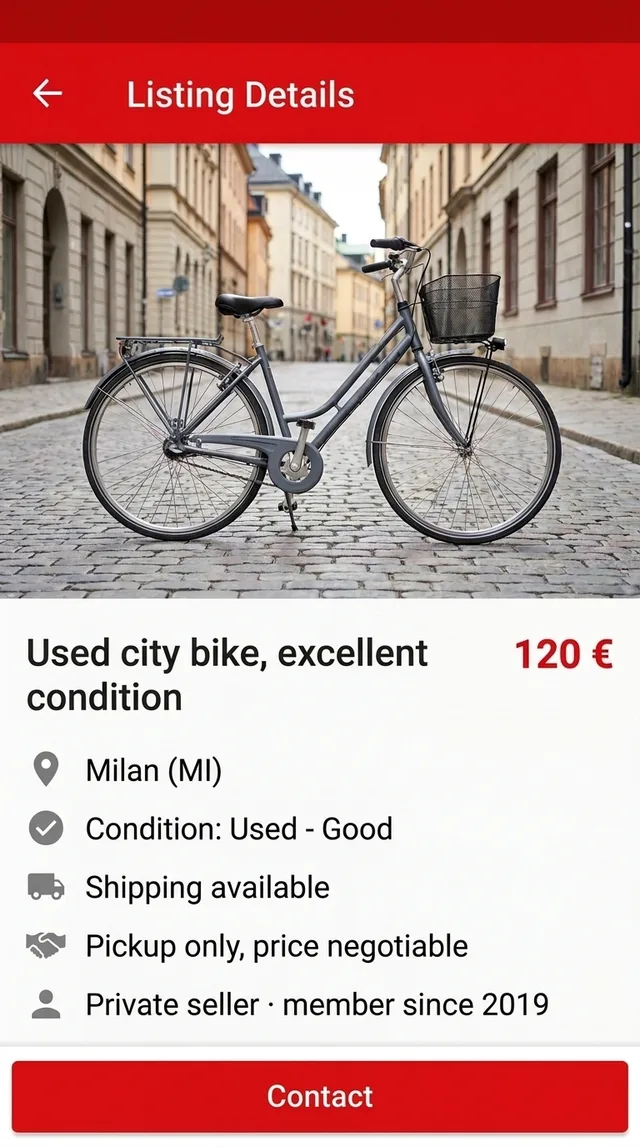
An Italian classifieds listing underneath, the same listing in English in the floating window
Text recognition runs on the phone, and only the recognized text goes to the cloud for translation. It reads whatever is visible, including text in the seller’s photos. It’s free to download; unlimited translation needs a Pro subscription.
Reading a Subito listing: price, condition and pickup
Take the bike. Top to bottom:
- Price and place. 120 €, Milano (MI). The letters in brackets are the province code, useful when a search pulls in towns an hour away.
- Condition. “Condizioni: Usato - Buono” means used, good condition. The dropdown is the seller’s own rating, so read the description for the dent or the worn chain.
- Shipping. “Spedizione disponibile” means the listing can be shipped. But the description says “Solo ritiro a mano, trattabile”: pickup in person only, price negotiable. When the two disagree, ask before you plan around shipping.
- The seller row. A private seller, with how long they’ve been on Subito and any reviews. Tap through to see their other listings.
- Contatta. Opens the chat. That’s where the real deal gets made.
The Subito terms you’ll see on every listing
The floating window translates all of these, but some come out literally. Knowing them by sight makes scrolling results faster.
| Italian | What it means for you |
|---|---|
| Nuovo / Usato | New / used |
| Come nuovo | Like new: used, but barely |
| Buono | Good: used with normal signs of wear |
| Trattabile | Price is negotiable |
| Ritiro a mano | Pickup in person, hand to hand |
| Spedizione disponibile | The item can be shipped |
| Privato / Azienda | Private seller / business seller |
| Regalo | Given away for free |
“Solo” in front of any of these means “only”. “Solo ritiro a mano” is a firm no to shipping.
Seller messages, haggling and staying safe
Chat is where the floating window helps most, because screenshotting a conversation bubble by bubble is slow. It reads; it doesn’t write. You compose replies yourself, and a few short phrases cover most of it:
- È ancora disponibile? Is it still available?
- Posso venire a vederla? Can I come and see it?
- Accetteresti 100 €? Would you accept 100 €?
- Qual è il prezzo più basso? What’s the lowest price?
Replies you’ll get back include “già venduto” (already sold) and “prezzo fisso” or “non trattabile” (fixed price).
On safety, the usual classifieds rules apply. Be wary of anyone who pushes you off the app’s chat, sends a link to “confirm payment” or asks for card details, or wants money before you’ve seen the item. For pickup, meet somewhere public and check the item before you pay. Translation helps you understand what someone wrote; it can’t tell you whether they mean it.
Poste Italiane English: Poste, SPID and the IO app
Sooner or later, anyone living in Italy meets Poste Italiane: parcels, bill payments, a BancoPosta account or a PostePay card. Some Poste Italiane apps may offer partial English, so check the language setting in each app before anything else.
Two related services come up constantly:
- SPID is Italy’s digital identity, used to log in to public administration services. Poste’s PosteID is one way to get it.
- The IO app collects messages and payment notices from public bodies. Whether it has an English option at the time you read this, check its settings.
These are banking and identity services, so be strict. A translation window helps you understand a status message, find the right menu, or see what a form field is asking for. It is not the place to decide what to pay or sign. Verify amounts, deadlines and anything binding with Poste Italiane or the issuing office, or with an Italian-speaking friend, before you confirm. Some banking apps also blank their content during screen capture, and then there’s nothing to translate. More on privacy: is a screen translator safe on iPhone?
Limits, and the rest of your Italian apps
- The translation trails the screen by a second or two. Scroll, pause, read.
- Tiny text in a seller’s photos and handwritten notes are weak spots. Zoom in first.
- Typed interface text is the strong spot, so listings and chat come out well.
The session doesn’t care which app is in front, so it covers train apps, delivery apps and your landlord’s messages too. If you’re in Italy for a semester, see apps for international students. If you’re moving on, the same approach works for French apps in English. The general version is translate your iPhone screen live.
Looking for a flat rather than a bike? Idealista in English covers rental listings in Italy, Spain and Portugal.
PiP Translate is on the App Store. Read the condition and the pickup terms first, then message the seller.
FAQ
Does Subito have an English version?
As far as we know, Subito's app and website are Italian only at the time of writing. Check the app's settings and the iOS per-app language row in case that changes, but listings and messages are written by Italian sellers, so they stay in Italian either way.
Can I use Subito as a foreigner?
Browsing works for anyone. Buying usually means meeting the seller in person or using a listing's shipping option, which generally assumes an address in Italy. Rules and options change, so check the current terms in the app before you commit to a purchase.
How do I translate the Subito app on iPhone?
Start a screen broadcast from PiP Translate with Italian set as the source language, then switch to Subito. A floating Picture in Picture window shows the same screen in English as you scroll listings and read messages. It does not change the Subito app itself.
Is the Poste Italiane app available in English?
Some Poste Italiane apps may offer partial English. Check the language setting inside each app first. For payments, identity (SPID) or anything binding, verify with Poste Italiane directly rather than relying on a translation.