Tokopedia in English on iPhone: Read Listings, Variants and Seller Chat When the App Switch Isn't Enough
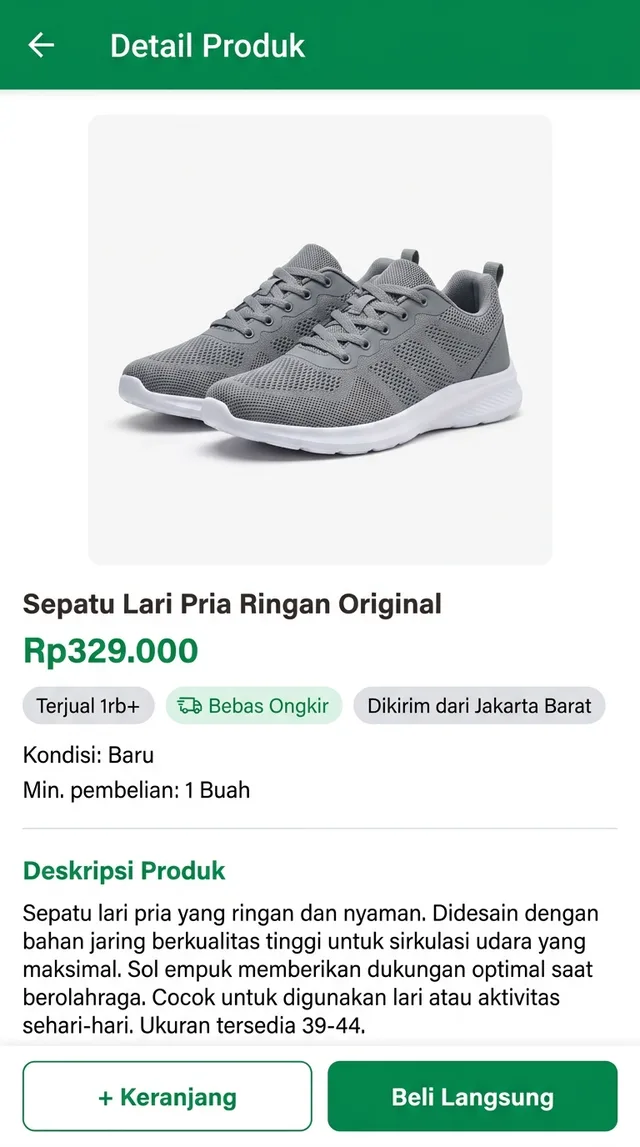
You found the running shoes. Rp329.000, a free-shipping badge, “Terjual 1rb+” under the title, and two green buttons you can guess at but would rather not. If you’re searching for Tokopedia in English, here is the honest status up front: Tokopedia has offered an English language option in some versions of the app, so check your settings first. What that switch can’t change is everything sellers type themselves. Listings, product descriptions, variant names, reviews and seller chat stay in Indonesian.
This guide covers both halves: what the built-in option gives you, and how to read the rest on iPhone.
Tokopedia in English: check the app first
Before translating anything, see what the Tokopedia app already does for you:
- The in-app language setting. Open your account page and look through the settings for a language option (“Bahasa” if the menu is still in Indonesian). Some versions have let you pick English; apps change, so look rather than assume.
- The iOS per-app language. Open iPhone Settings, find Tokopedia in the Apps list and look for a Language row. It only appears if the app ships more than one language and your phone has more than one preferred language.
- The website in Safari. tokopedia.com works in a browser, and Safari’s page translation handles Indonesian text. It won’t help inside the native app, or with text baked into product images.
If the switch works for you, the menus, buttons and checkout labels will read in English. That’s a real help. It’s also where the English ends.
Where the Indonesian stays
Everything a seller writes is Indonesian, whatever your app language is set to:
- Product titles and descriptions, often long, keyword-stuffed and full of abbreviations.
- Variations. Size, colour and model names chosen by the seller, sometimes with stock notes attached (“stok terbatas”, limited stock).
- Product photos with sizing charts and spec sheets printed on them.
- Reviews from other buyers.
- Seller chat, which is where you ask whether size 42 runs small.
This is also the situation with most Indonesian apps in English: the frame is translated, the content isn’t.
Reading the rest in a floating window
PiP Translate (App Store name: PiP Screen Translate) covers the part the language switch leaves behind. You start an iOS screen broadcast from the app, switch to the Tokopedia app, and a Picture in Picture window floats next to it showing the same screen in English. The Tokopedia app itself isn’t changed: the text underneath stays Indonesian, and you still tap the real buttons. The window just keeps a translated copy of whatever is on screen as you scroll.
Drag the window to a corner, pinch to resize it, or swipe it off the edge when it covers something you need. Set Indonesian as the source language instead of Auto. If auto-detect guesses wrong, you get the text back untranslated, and short Indonesian labels are exactly the kind that can be misread. Text recognition happens on the phone, and only the recognised text is sent for translation.
 PiP Translate
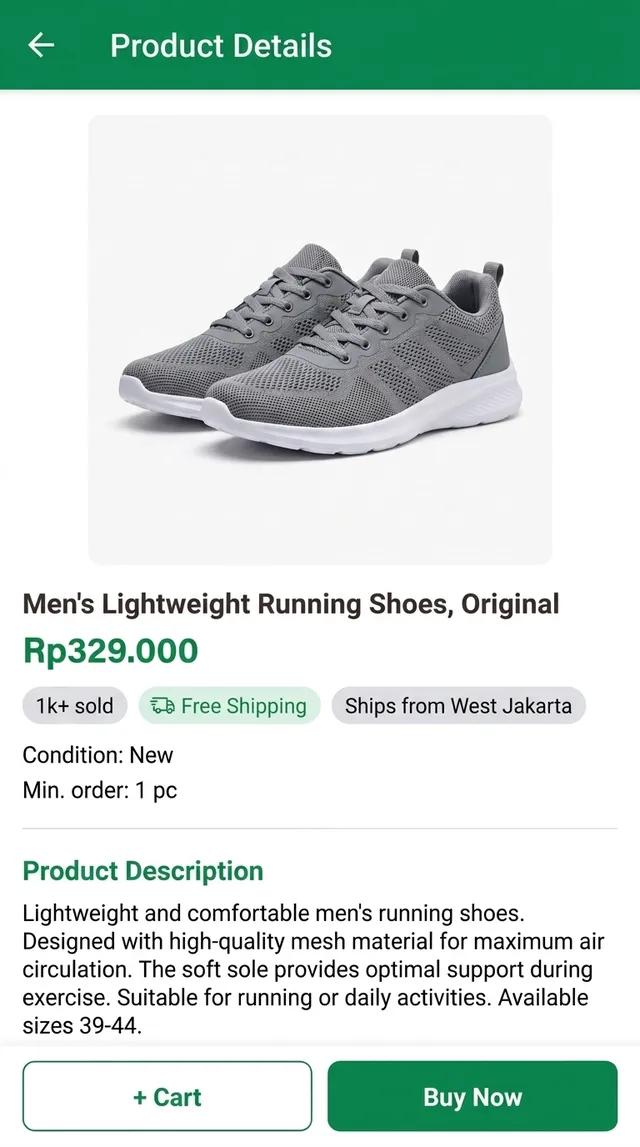
An Indonesian product page for running shoes underneath, the same page in English in the floating window
The longer explanation of how this works on iOS is in translate your iPhone screen live.
Reading a Tokopedia product page, line by line
Take the shoe listing from the screenshot above. Here’s what each line is telling you:
- Rp329.000 is 329,000 rupiah. Indonesia uses a full stop as the thousands separator, so don’t read it as 329 with decimals.
- Terjual 1rb+ means more than a thousand sold. It’s a signal of volume, not quality; read the reviews too.
- Bebas Ongkir is free shipping, usually within limits set by the promotion. Check the checkout screen for what actually applies to your address.
- Dikirim dari Jakarta Barat means shipped from West Jakarta. Useful for guessing delivery time if you’re elsewhere in Indonesia.
- Kondisi: Baru means condition: new. On second-hand items you’ll see Bekas instead.
- Min. pembelian: 1 Buah is the minimum order: one piece. “Buah” is just a counting word here.
- + Keranjang adds the item to your cart; Beli Langsung skips the cart and goes straight to checkout.
Then scroll down. The description and the variant picker are where sellers mention that the sizes follow a specific chart, or that a colour is out of stock. With the floating window open, you read them at normal speed instead of copying paragraphs into a translator.
Tokopedia terms worth recognising
The window translates all of these, but they appear on nearly every listing, so knowing them by sight speeds things up.
| Indonesian | What it means |
|---|---|
| Terjual 1rb+ | 1,000+ sold (“rb” = ribu, thousand) |
| Bebas Ongkir | Free shipping |
| Ongkir (ongkos kirim) | Shipping cost |
| Kondisi: Baru / Bekas | Condition: new / used |
| Keranjang | Cart |
| Beli Langsung | Buy now, straight to checkout |
| COD / Bayar di Tempat | Cash on delivery, pay when it arrives |
| Official Store / Power Merchant | Seller badges: a brand’s official shop / an established seller tier |
A seller badge tells you who you’re buying from. It doesn’t replace reading the description and the reviews.
Gojek, Bukalapak and other Indonesian apps in English
The same broadcast works on whatever Indonesian app is in front, so one setup covers your phone.
- Gojek has an English interface, so rides and food orders are mostly readable already. Restaurant menus, merchant notes and messages from drivers can still arrive in Indonesian.
- Bukalapak is another Indonesian marketplace. It has shifted its focus in recent years, so check what it currently sells; where its screens are Indonesian, the floating window reads them the same way.
- Shopee Indonesia follows the pattern of its sister sites: see our Shopee Thailand guide for the same approach in another market.
Limits, and what translation can’t do for you
- The translation trails the screen by a second or two. Scroll, pause, read.
- Tiny text in product photos comes out better if you zoom into the image first. Stylised fonts on banners are a weak spot.
- It reads; it doesn’t write. To ask a seller a question you’ll compose the Indonesian yourself, in any text translator, and paste it into chat.
- Some payment and banking screens blank their content while the screen is being recorded, and then there’s nothing to translate.
- The app is free to download; unlimited translation needs a Pro subscription.
On payments: a translated checkout helps you understand what each option and fee line says. It isn’t confirmation of the amount. Check the total, the shipping cost and the payment method yourself before you pay, and for refunds or disputes, go through Tokopedia’s own help channels.
PiP Translate is on the App Store. Check Tokopedia’s language setting first, then read the listings, variants and chat in English.
FAQ
Does Tokopedia have an English version?
Tokopedia has offered an English language option in some versions of the app, so check the language setting in your account menu first. Even with it switched on, product titles, descriptions, variant names, reviews and seller chat are written by Indonesian sellers and stay in Indonesian.
How do I translate Tokopedia on iPhone?
Switch the app to English if your version offers it, then use a screen translator for the rest. PiP Translate starts an iOS screen broadcast and shows the same Tokopedia screen in English in a floating Picture in Picture window, so you can scroll listings and read chat without screenshots. Set Indonesian as the source language rather than Auto.
Can I use Tokopedia as a foreigner or from abroad?
Browsing is easy from anywhere. Buying is built around Indonesia: sign-up usually expects a phone number, delivery goes to Indonesian addresses, and payment options are local. If you live in Indonesia it tends to work; from abroad, check what the app accepts at the time you try.
What does 'Terjual 1rb+' mean on Tokopedia?
It means more than 1,000 sold. 'Rb' is short for 'ribu', the Indonesian word for thousand, so '1rb+' reads as one thousand plus.