Shopee Thailand English on iPhone: The Menus Switch to English, the Listings Stay Thai
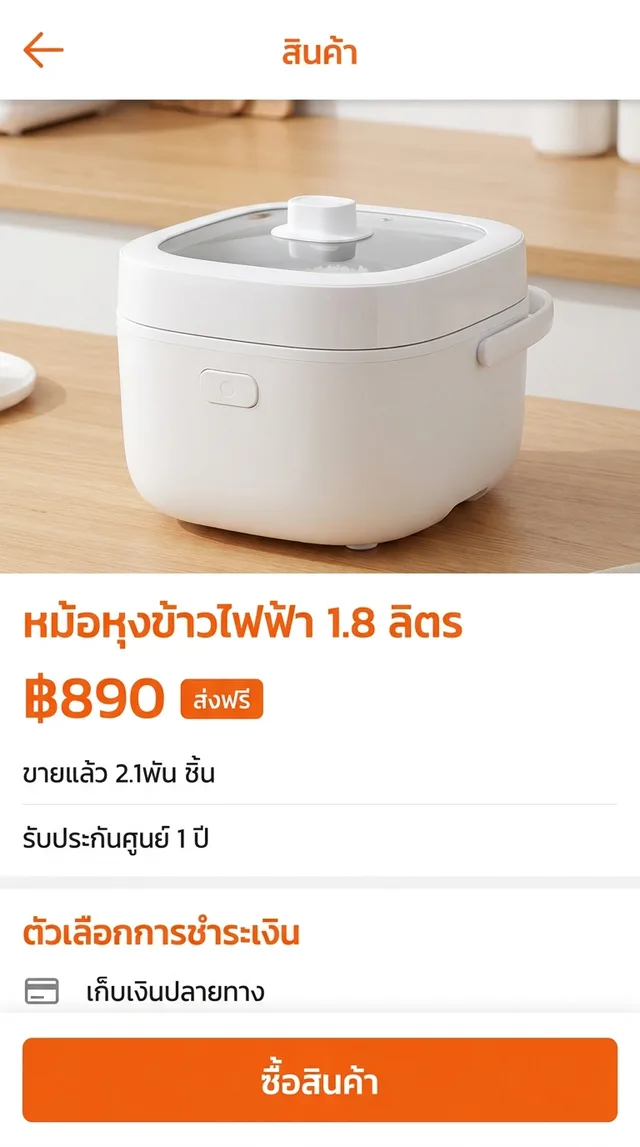
You found the rice cooker. 1.8 litres, ฿890, a badge that says ส่งฟรี, a counter that reads ขายแล้ว 2.1พัน ชิ้น, and a long description underneath that you can’t read. If you searched for Shopee Thailand English, here is the honest status first: in many regions Shopee lets you switch the app’s own interface to English, and Thailand has been one of them. That fixes the menus. It does not fix the listing, because the listing was written by a Thai seller, in Thai, for Thai buyers.
So there are two jobs. Flip the switch Shopee gives you, then deal with everything the switch doesn’t reach.
What the English setting covers, and what it doesn’t
Start with the built-in option. In the Shopee app, open your account tab and look through the settings for a Language option. Placement and wording move around between versions, so if you can’t find it, also check the iOS side: Settings, then Apps, then Shopee, and look for a Language row. That row only appears when the app ships more than one language.
With Shopee English switched on, you should see English for:
- Tabs, search filters and the cart
- Checkout steps, payment method names and order status
- Shopee’s own buttons and system messages
What stays Thai, because Shopee didn’t write it:
- Product titles and descriptions. The spec list, the “what’s in the box”, the warranty conditions.
- Variations. Capacity, colour, plug type or bundle, named however the seller liked.
- Reviews. Other buyers describing whether it arrived dented or cooks rice properly.
- Seller chat and shop notices. Holiday closures, dispatch times, “ask before ordering”.
- Text inside images. Many listings put the key specs on promotional graphics, not in the description.
Shopee’s website works in Safari too, and Safari’s Translate option handles real text on a page. It can’t read text baked into images, and it doesn’t help once you’re back in the app, which is where most people actually shop.
Shopee Thailand English for the rest: a floating translation window
PiP Translate (on the App Store as PiP Screen Translate) covers the part the language switch leaves behind. You start an iOS screen broadcast from the app, switch to Shopee, and a Picture in Picture window floats next to it showing the same screen in English. Scroll the search results, open a listing, swipe through the photos; the window follows.
It is a separate window, not a rewrite of Shopee. The app underneath is unchanged, so whatever you tap is still Shopee’s own button. Drag the window to a corner, pinch to resize it, or swipe it off the edge of the screen when it’s covering the price.
One setting matters: choose Thai as the source language instead of Auto. If auto-detect guesses wrong, the text comes back untranslated.
 PiP Translate
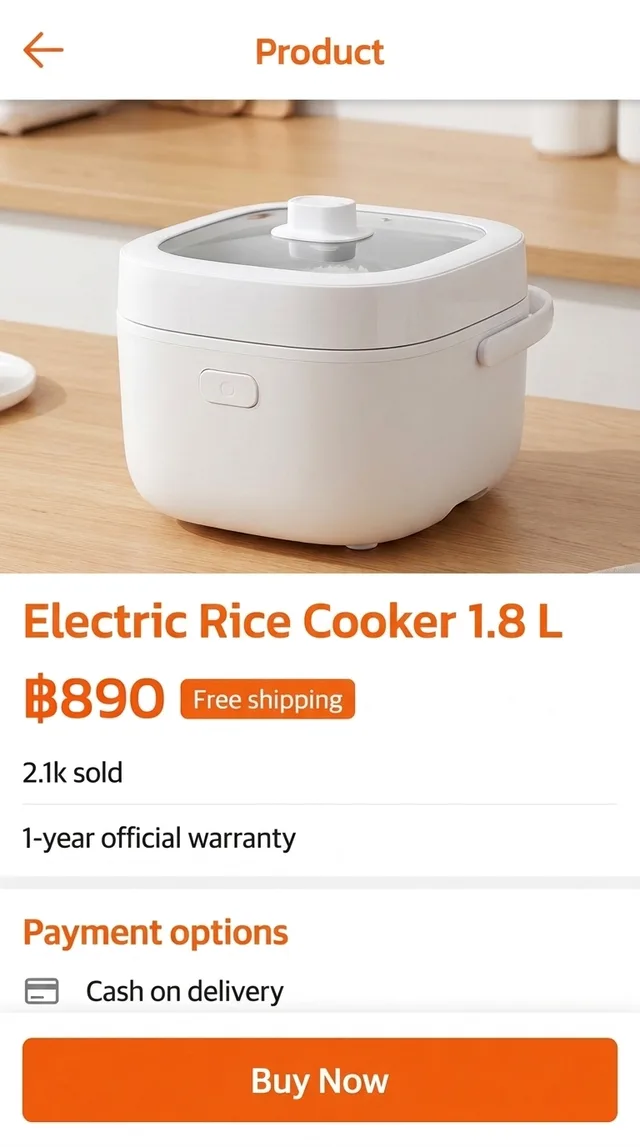
A Thai product page underneath, the same page translated to English in the floating window
Text recognition happens on the phone, and only the recognized text goes to the cloud for translation. It doesn’t matter whether the words are Shopee’s UI, a seller’s description or a spec graphic. The app is free to download; unlimited translation needs a Pro subscription.
Reading a Thai product page before you tap ซื้อสินค้า
Take the rice cooker from the top.
The price. ฿890 is a number, so it needs no translation. What needs checking is which variation that price belongs to. The headline price is often the cheapest option, and the model you want may cost more. Tap each variation and read what it actually is.
ส่งฟรี. Free shipping, sometimes with conditions such as a minimum spend. If there’s small print next to the badge, read it.
ขายแล้ว 2.1พัน ชิ้น. About 2,100 units sold. That tells you it’s popular, not that it’s good. The reviews tell you that.
รับประกันศูนย์ 1 ปี. A one-year official warranty, handled through the brand’s service centres rather than by the shop. Read the description for what the seller says about claims.
The reviews. Scroll them with the window open. Look for photos, complaints about damage in transit, and whether the voltage and plug match what you have at home.
Thai shopping words worth recognizing
The window translates all of these, but they appear so often that knowing them by sight speeds up browsing:
| Thai | What it means for you |
|---|---|
| ส่งฟรี | Free shipping |
| เก็บเงินปลายทาง | Cash on delivery (COD): pay the courier when it arrives |
| ขายแล้ว | Sold so far. พัน means thousand, so ขายแล้ว 2.1พัน is about 2,100 sold |
| รับประกัน | Warranty. รับประกันศูนย์ is the official brand warranty |
| ร้านค้าแนะนำ | Recommended shop |
| โค้ดส่วนลด | Discount code |
| ซื้อสินค้า | Buy (the purchase button) |
Seller chat, payments and what you still do yourself
Chat is where the window saves the most time. A seller’s reply about stock, dispatch dates or which plug ships to your province is usually a few Thai sentences, and you can read the thread as it scrolls instead of screenshotting each bubble.
It reads; it doesn’t write. To reply, compose your message in any text translator and paste it in. Short and simple works best.
Payments deserve care. The translation helps you understand the screen, but it is not a statement of what you owe. Check the final total, the payment method and any COD or voucher terms on the checkout screen itself, and use Shopee’s official help channels for disputes, refunds and anything involving your money.
The same problem on LINE MAN, Wongnai and other Thai apps in English
Shopee is typical of Thai apps in English: the platform may offer an English interface, but the content comes from Thai businesses. LINE MAN and Wongnai are the food version of the same problem. Check each app’s language setting first. Restaurant menus, dish names and reviews are still mostly written in Thai by the restaurants and diners, and the floating window reads those the same way it reads a Shopee listing.
If you shop across the region, the Tokopedia guide covers Indonesia, and Taobao in English covers Chinese marketplaces. The general explanation lives in translate your iPhone screen live.
Honest limits
- The translation trails the screen by a second or two. Scroll, pause, read.
- Small text inside product photos comes out better if you zoom into the photo first.
- Decorative fonts on promotional banners are a weak spot. Plain description text is the strong one.
- It shows you the screen in English; it can’t make a seller ship abroad or accept your card.
Switch the menus to English, float the rest, and you can compare that rice cooker against the next three listings without guessing.
PiP Translate is on the App Store. Set Thai as the source, open Shopee, and read the listing before you buy.
FAQ
Does Shopee Thailand have an English version?
In many regions Shopee lets you switch the app interface to English, and at the time of writing Thailand is one of them: look for a Language option in your account settings. That changes Shopee's own menus, buttons and checkout steps. Product titles, descriptions, variations, reviews and seller chat are written by Thai sellers and stay in Thai.
How do I translate Shopee Thailand listings on iPhone?
Switch the app to English first. For the Thai text that remains, start a screen broadcast in PiP Translate, set the source language to Thai, and open Shopee. A floating Picture in Picture window shows the same screen in English while you scroll listings, reviews and chats.
Can I use Shopee Thailand as a foreigner or from abroad?
Foreigners living in Thailand use it every day. From abroad it is harder: accounts generally expect phone verification, checkout expects a delivery address, and many sellers only ship within Thailand. Check the app's own sign-up and shipping options for your situation rather than assuming.
What does เก็บเงินปลายทาง mean on Shopee?
Cash on delivery (COD). You pay the courier when the parcel arrives instead of paying online at checkout, where the seller offers it.