Taobao in English on iPhone: Read Listings, Size Charts, Seller Chat and Checkout Before You Pay
You have found the cardigan. ¥89, beige, oversized, exactly the one from the photo someone sent you. Then you scroll down and it’s all Chinese: a size chart with three columns you can’t read, a line of red text under it, a chat button, and a big orange button at the bottom that you are fairly sure means “buy now”. Shopping Taobao in English on an iPhone mostly comes down to those four things, and this guide walks through each of them.
First, the honest status, because older guides (including an earlier version of this one) got it wrong.
Does Taobao have an English version now?
Partly. Recent versions of the Taobao app have added English and other language options aimed at overseas users, in some regions. Where to find it changes between versions, so look in Settings inside the app for a language option, and check whether your region gets the overseas version of the app. If you see it, switch it on: it should make the menus, tabs and order pages easier to follow.
What it does not change is everything written by people. Seller listings, the long detail images under each product, size charts, “runs small” notes, reviews, buyer photos and customer-service chat are typed or designed by Chinese sellers and buyers for Chinese shoppers. In practice they stay Chinese. That’s where the decisions get made: fit, material, delivery time, whether the seller will swap a size.
So the real question isn’t whether there’s a Taobao English app. It’s how to read the Chinese parts without screenshotting every page.
Before installing anything, try the free options on your iPhone. They cover more than you might expect.
- Safari’s page translation. Taobao has a website. Open a listing in Safari, tap the page menu, choose Translate. Real text gets translated in place. Images of text don’t.
- Live Text. Take a screenshot, open it in Photos, tap the text icon, then Translate. Accurate for one screen, including size-chart images.
- Taobao’s own image search. Search by photo instead of typing Chinese keywords. It sidesteps the search box entirely.
Where these run out is the actual shopping loop. Comparing five sellers, flipping through a size chart, reading twenty reviews, then asking the seller a question means dozens of screenshots and app switches, and most of the app itself has nothing you can select.
Taobao in English with a floating translation window
PiP Translate (on the App Store as PiP Screen Translate) takes a different route. You start an iOS screen broadcast from the app, switch to Taobao, and a Picture in Picture window floats next to it showing the same screen in English. Scroll the search results, open a product, swipe through the detail images; the window follows. Drag it to a corner, pinch to resize it, or swipe it off the edge when it covers something you need.
It doesn’t rewrite Taobao and it doesn’t draw over the Chinese text. Taobao stays exactly as it is underneath, and the buttons you tap are still the Chinese ones. The translated copy lives in its own window.
One setup step matters more than the rest: set the source language to Chinese rather than Auto. If auto-detect guesses wrong, you get the text back untranslated.
 PiP Translate
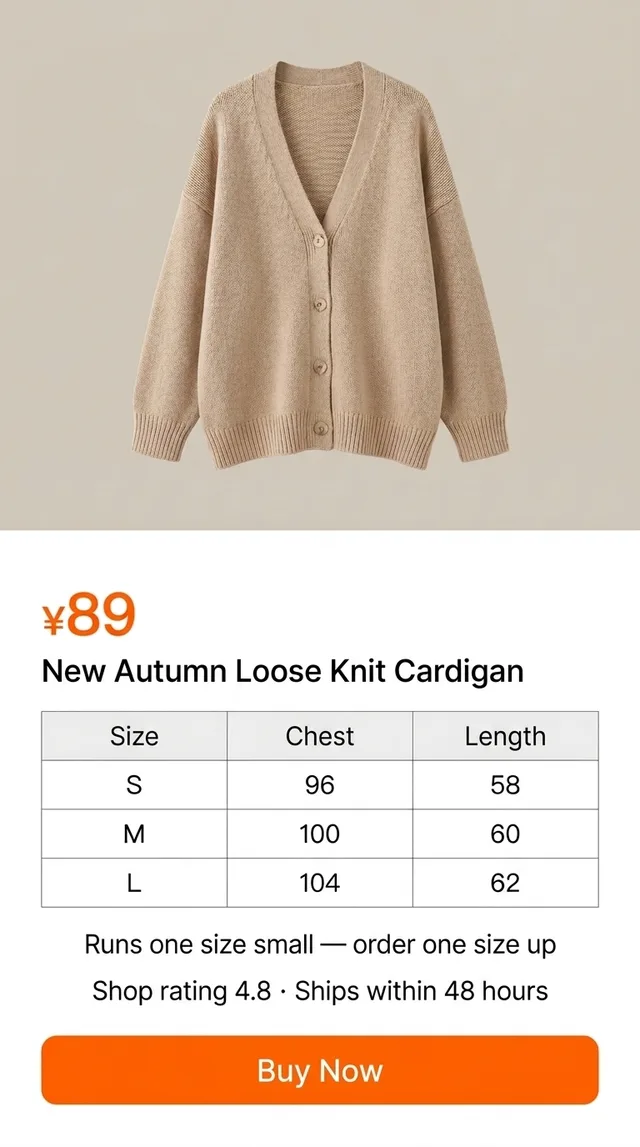
The Chinese product page stays open underneath; the floating window shows the same page in English, size chart and "runs small, size up" note included
Text recognition runs on the phone, and only the recognized text is sent for translation. Because it reads whatever is visible, it treats app menus, detail images and chat bubbles the same way. It’s free to download; unlimited translation needs a Pro subscription.
Reading the listing, the size chart and the “runs small” note
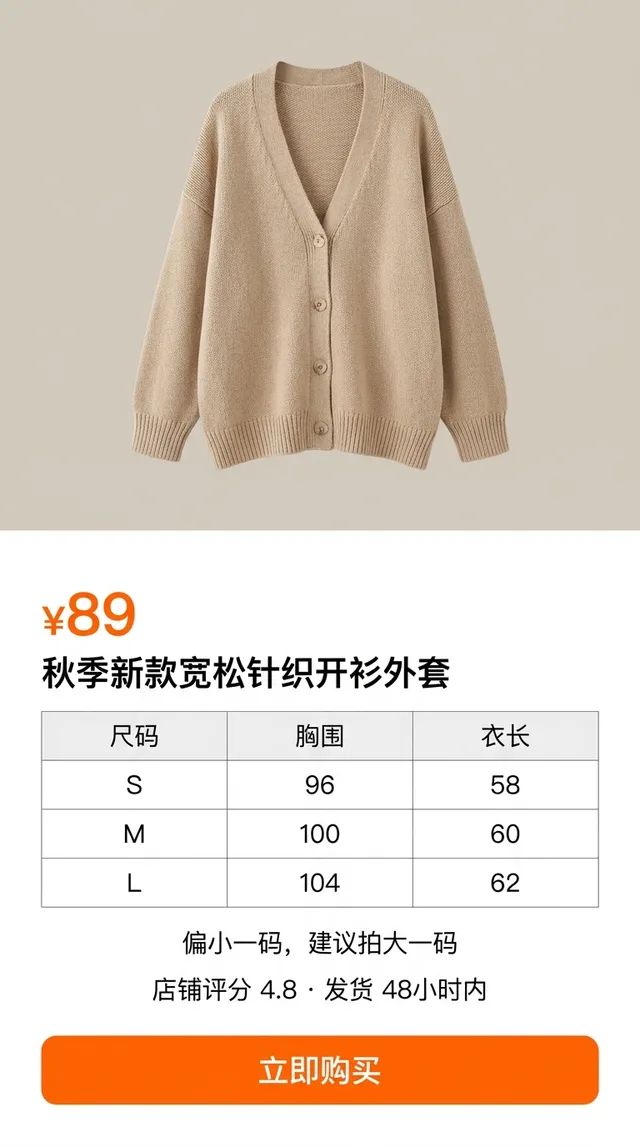
The title on a Taobao listing is keyword soup. Ours reads 秋季新款宽松针织开衫外套: autumn, new style, loose, knit, cardigan, jacket. Sellers stack every searchable word in there, so the translation will read like a list, because it is one. The useful information is further down.
Scroll past the photos to the size chart. It’s often an image rather than text, which is exactly where Safari gives up. The one in our example reads:
| 尺码 (size) | 胸围 (chest, cm) | 衣长 (length, cm) |
|---|---|---|
| S | 96 | 58 |
| M | 100 | 60 |
| L | 104 | 62 |
Measurements are in centimetres and usually describe the garment laid flat or measured around, not your body. Take a similar piece you already own, measure it, and compare. Don’t just match S/M/L to what you’d buy at home; Chinese sizing often runs smaller.
Then look for the note near the chart. Ours says 偏小一码,建议拍大一码: runs one size small, we suggest ordering one size up. That line decides the order more than the chart does. The opposite, 偏大, means it runs large. Also check the shop rating (4.8 here) and the shipping promise, in this case dispatch within 48 hours.
Seller chat, reviews and buyer photos
Customer service. Every shop has a chat button, labelled 客服 (customer service), and you’ll also see 旺旺, the name of Taobao’s messaging system. Sellers answer fit questions, confirm stock and sometimes offer a size swap. With the floating window open, their replies appear in English as they arrive. Writing back is your part: the window reads, it doesn’t compose messages. Short, simple sentences run through a translator work fine, and many sellers are used to them.
Reviews and 买家秀. Buyer photos, 买家秀 (“buyer show”), are the most honest part of any listing: real people, real lighting, the real colour of that “beige”. Open the reviews, filter to ones with pictures, and scroll. Watch for repeated complaints about thin fabric, colour or sizing. If three people mention 偏小, believe them.
Checkout and order status: check it before you pay
The orange button, 立即购买, is Buy Now. Before you press it, read the order screen properly. Confirm the size and colour you picked, the quantity, the delivery address, and the total including any shipping. Watch for 预售 (pre-sale) on the product: it ships later than a 现货 (in stock) item, sometimes weeks later.
After payment, the order moves through statuses you’ll check more than once: waiting to ship, 已发货 (shipped), then delivered. The 七天无理由退货 badge means a seven-day no-reason return is offered, though how that works for overseas delivery depends on the seller and your shipping route.
A note on money. Payment methods, overseas shipping options and fees vary by region and change over time. The translation helps you understand the screen; it isn’t a guarantee of what you’ll be charged. Check amounts, currency and shipping costs on the official screens before you pay, and contact Taobao’s official support for anything about a charge or refund.
Taobao jargon worth recognizing
The translation window will render all of these, but you’ll see them on nearly every listing, and recognizing them at a glance speeds everything up.
| Chinese | What it means for you |
|---|---|
| 包邮 | Free shipping (usually within mainland China, not to you abroad) |
| 偏小 / 偏大 | Runs small / runs large |
| 拍下 | To order it (literally “snap it up”); 拍大一码 = order one size up |
| 现货 / 预售 | In stock / pre-sale, ships later |
| 七天无理由退货 | Seven-day return, no reason needed |
| 旺旺 / 客服 | Taobao’s chat / the shop’s customer service |
| 买家秀 | Buyer photos in the reviews |
| 已发货 | Shipped |
Honest limits, and the rest of the Chinese app world
It isn’t perfect. The translation trails the screen by a second or two. Very small text inside detail images, decorative promo fonts and livestream overlays are the weak spots; zoom into an image until the text is large and the result improves a lot. Size charts come through well once they fill enough of the screen. For anything that affects money or fit, read it twice.
The same session works in any app, which matters because Taobao is rarely the only one. For wholesale sourcing with MOQ tiers and bulk pricing, see 1688 in English on iPhone. For group-buy deals, see Pinduoduo in English. And if you’re living in or visiting China rather than ordering from abroad, the Chinese apps survival guide covers maps, delivery, payments and the rest.
Get PiP Translate on the App Store, set the source to Chinese, and read the size chart before you tap Buy Now.
FAQ
Does Taobao have an English version?
Partly. Recent versions of the Taobao app have added English and other language options for overseas users in some regions, so check the app's settings for a language option or look for the overseas version. What it translates is mainly the app's own menus. Listings, detail images, size charts, reviews and seller chat are written by Chinese sellers and buyers, and they usually stay in Chinese.
Is there a Taobao English app?
There isn't a separate English-only Taobao app for most people; the main app's language options and overseas features vary by region and version. For the parts that stay Chinese, a screen translator such as PiP Translate shows the same screen in English in a floating window while you keep using Taobao.
How do I read a Taobao size chart in English?
Find the size chart in the listing (often an image in the details section), then read it through a screen translator or Live Text. Measurements are in centimetres. Compare the chest (胸围) and length (衣长) columns with a garment you own, and look for notes like 偏小 (runs small), which usually means ordering one size up.
Can I use Taobao from abroad as a foreigner?
Many people outside China do, but what works depends on your region and the current version of the app: sign-up, payment options and overseas shipping all vary. Check what Taobao offers in your country at the time you order, and confirm amounts and shipping costs yourself before you pay.