Pinduoduo in English on iPhone: Reading Group Buy Prices, Coupons and 砍一刀 Without Leaving the App
You found a phone case for the price of a coffee, someone sent you a Pinduoduo link, or a friend in China swears everything is cheaper there. Then you open the app and every button is in Chinese. People searching for Pinduoduo in English usually want the same thing: to read this app, with its group prices and countdown timers, well enough to know what they are agreeing to.
Here is what exists, what doesn’t, and how to read the screen without screenshotting every product page.
Is there a Pinduoduo English version?
Short answer: not for the Chinese app. At the time of writing, 拼多多 (Pinduoduo) has no English interface and no language switch in its settings.
Temu is run by the same company, but it is a separate international store with its own catalog and prices, so it is not Pinduoduo in English. If the listing you want is on Pinduoduo, you have to read Pinduoduo.
Still worth a quick check before you translate anything:
- The app’s own settings. Look under your profile (个人中心) and settings (设置) for a language option. We are not aware of one, but apps change.
- The iOS per-app language. In iPhone Settings, find the Pinduoduo app and look for a Language row. It only appears when an app ships more than one language. No row means Chinese only.
- Safari. Pinduoduo is built around its phone app. Unlike stores with a full desktop site, there is rarely a web page for Safari’s Translate button to work on.
So for the Pinduoduo app itself, the practical route is translating what’s on the screen.
How the floating translation window works
PiP Translate (App Store name: PiP Screen Translate) doesn’t change Pinduoduo. It shows you a second, translated copy of the screen.
- Open PiP Translate and set the source language to Chinese. Don’t leave it on Auto. If auto-detect guesses wrong, the text comes back untranslated.
- Start the iOS screen broadcast from the app.
- Switch to Pinduoduo. A Picture in Picture window appears showing the same screen with the text in English.
The Chinese app stays underneath, untouched, and you tap it as usual. The translation lives in its own window: drag it to a corner, pinch to resize it, or swipe it off the edge when it covers the button you need. Text recognition runs on the phone, and only the recognized text is sent for translation.
 PiP Translate
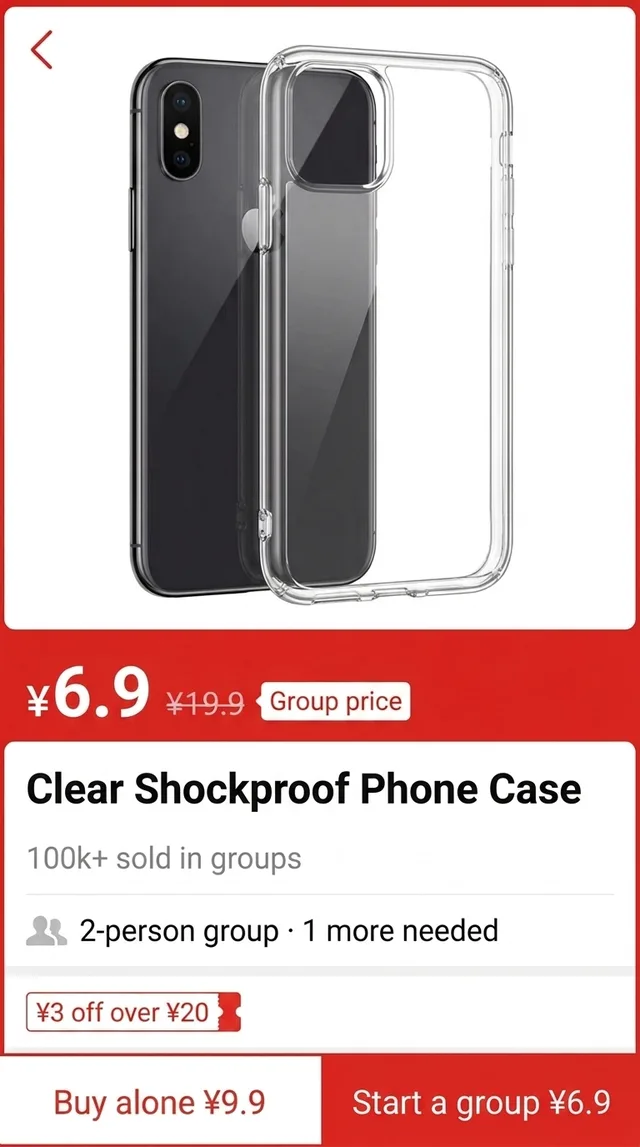
A Chinese group-buying product page underneath, the same page in English in the floating window
How a group buy works on a Pinduoduo product page
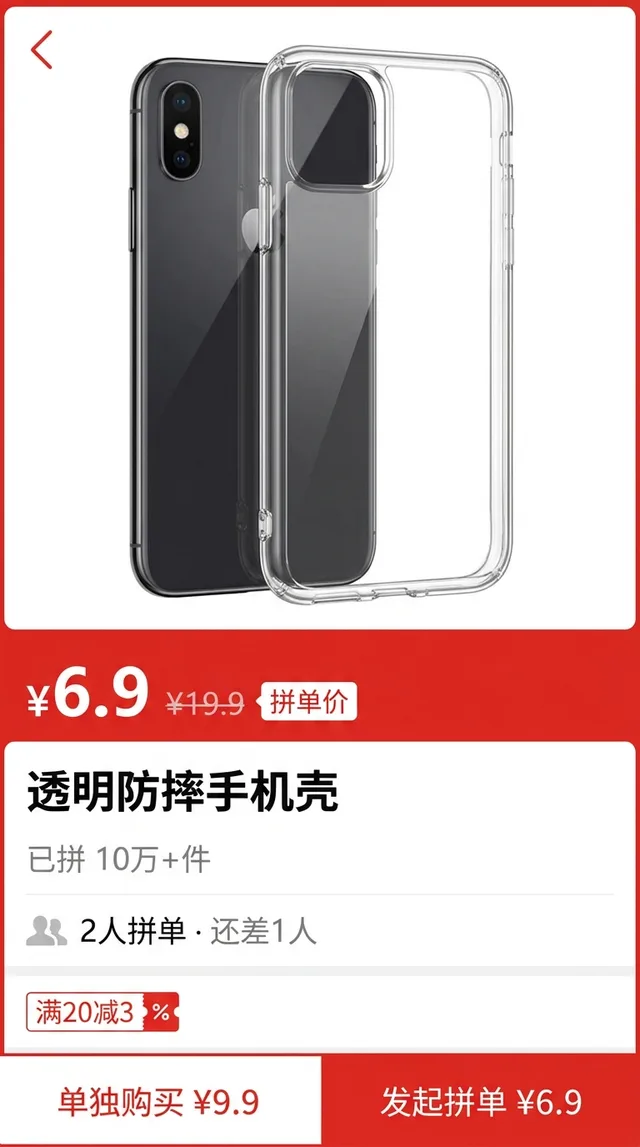
Group buying is the reason Pinduoduo exists, and it’s the part a literal translation explains worst. Take the phone case in the screenshot above.
- Two prices, two buttons. The big number marked 拼单价 is the group price, ¥6.9 in this example. The bottom bar has two buttons: 单独购买 (buy alone, at the higher solo price) and 发起拼单 (start a group order, at the group price).
- “2人拼单 · 还差1人” means “2-person group, 1 more person needed.” Some product pages list groups other shoppers have already opened, so you can join one and complete it instead of starting your own.
- “已拼10万+件” is the sales counter: 100,000+ units sold through group orders.
As we understand it, when you start a group you pay upfront and the group has a time limit to fill. If nobody joins in time, the order is cancelled and refunded. On many products the group fills almost at once, because so many people are shopping the same item. Group sizes and rules vary by product and change over time, so read the rules on the product page and at checkout, not this summary.
Coupons, subsidies and 砍一刀: the Pinduoduo jargon table
The translation window renders all of these. They just come up so often that recognizing them on sight makes browsing faster.
| Chinese | Plain-English meaning |
|---|---|
| 拼单 | Group order: buy together with others at the lower group price |
| 单独购买 | Buy alone, at the higher solo price |
| 百亿补贴 | ”Ten-billion subsidy”: Pinduoduo’s platform-subsidized discount program, mostly on brand-name goods |
| 砍一刀 | ”Cut once”: share a link so friends tap it to knock the price down |
| 包邮 | Free shipping, usually within mainland China, and remote regions are sometimes excluded |
| 退货包运费 | Return shipping covered, so you don’t pay postage to send it back |
| 仅退款 | Refund only: you get your money back without returning the item |
A few notes. Coupons read like 满20减3: ¥3 off once your order reaches ¥20. 砍一刀 is a share-to-discount game, not a coupon. Each friend’s tap cuts a little, and the last part of the target usually gets much slower, so don’t plan around it. 仅退款 and 退货包运费 depend on the listing and the situation, so check what the product page actually promises.
Paying, refunds and using the Pinduoduo app from abroad
Reading the app is a language problem. Buying from it is often a logistics problem, and translation only fixes the first one.
The Pinduoduo app is built for mainland China. Sign-up usually goes through a Chinese phone number or WeChat. Payment runs through Chinese methods such as WeChat Pay and Alipay. Most sellers ship to addresses in China. People abroad often use a forwarding address or an agent service. Requirements change, so check the app’s current options rather than assuming.
Wherever money is involved, the translation helps you understand the screen. It doesn’t replace checking. Before you pay, confirm the final amount on the checkout screen, the option (color, phone model) you selected, and the refund terms on that listing. If a dispute or a large order is at stake, go through Pinduoduo’s own customer service or your agent, not a translated guess.
Honest limits
- The translation trails the screen by a second or two. Scroll, pause, read.
- Pinduoduo product pages love images packed with stylized text. Big, clean fonts read well. Tiny or decorative text in product photos is the weak spot, so zoom in first.
- It reads. It doesn’t write. To message a seller, you still compose your Chinese elsewhere.
- Some payment screens hide their content during a screen broadcast, and then there’s nothing to translate.
- It’s free to download, and unlimited translation needs a Pro subscription.
The same setup for the rest of your Chinese apps
Once the broadcast is running, it doesn’t care which app is in front. If you’re comparing prices, the same setup covers Taobao in English and wholesale listings on 1688. If you’re living in China or visiting, see the broader Chinese app survival guide.
PiP Translate is on the App Store. Open Pinduoduo, set Chinese as the source, and read the group price before you tap 发起拼单.
FAQ
Does Pinduoduo have an English version?
At the time of writing, the Chinese Pinduoduo app has no English interface. Temu is run by the same company, but it is a separate international store with its own catalog, so switching to it does not show you Pinduoduo's listings in English. To read the Chinese app itself, you need to translate the screen.
How do I translate Pinduoduo on iPhone?
Start a screen broadcast in PiP Translate, set Chinese as the source language, then open Pinduoduo. A Picture in Picture window shows the same screen in English while you scroll and tap in the original app.
Can I use Pinduoduo from outside China?
It depends. The app is built around mainland China: sign-up usually expects a Chinese phone number or WeChat, payment runs through Chinese methods, and delivery is generally to addresses in China. Many buyers abroad use a forwarding or agent service. Check the app's current options before you plan an order.
What does 拼单 mean on Pinduoduo?
拼单 means a group order. You get the lower group price by starting a group or joining one someone else started. The alternative is 单独购买, buying alone at the higher price.