Surugaya in English: How to Read Japanese Figure, Game and Manga Listings on iPhone Before You Buy
You found the figure you want on Surugaya, and it costs less than anywhere else you’ve looked. The page is in Japanese. People searching for Surugaya in English usually want two things: to understand exactly what the listing says, and to get the item to their door. Those are separate problems.
The honest status first. Surugaya (also written Suruga-ya, 駿河屋) is a Japanese store for used and new games, figures, anime goods, manga and music, and its site and app are built in Japanese. Whether it ships overseas directly, or whether you need a proxy or a forwarding address, has changed over time. Check Surugaya’s current help and FAQ pages before you plan anything, because a guide written today can be out of date by next season.
Surugaya in English: what you can already use
Try the free options first:
- Safari’s page translation. Open the Surugaya website in Safari, tap the page menu and choose Translate. Real text gets translated in place, and for a quick look at a listing that is often enough.
- The iOS per-app language. In Settings, find the Surugaya app and look for a Language row. It only appears if the app ships with more than one language. If there’s no row, the app is Japanese only.
- A proxy’s English mirror. Several proxy services show Surugaya items on their own sites with machine-translated titles and descriptions.
Where these run out: inside the app, where nothing can be selected; on text baked into product photos and banners; and on the short condition remarks that decide whether a used item is a bargain or a disappointment.
Why read the original listing yourself
A proxy’s mirror is a copy. It may translate the title and skip the condition field, drop the remark about the box, or render a fixed store term so literally that it stops meaning anything. On a used 1/7 scale figure, “box damaged” versus “part missing” is the difference between a good deal and a return you can’t make.
Reading the original page is the safer habit. You still might need a proxy to check out, but you’ll paste in a link you actually understood.
How the floating translation window works
PiP Translate (App Store name: PiP Screen Translate) covers the gaps. You start an iOS screen broadcast from the app, switch to Surugaya, and a separate Picture in Picture window appears next to it showing the same screen with the text in English. Surugaya itself stays exactly as it is; the English lives in the floating window. Scroll search results, open a listing, zoom into a photo, and the window follows. Drag it to a corner, pinch to resize it, or swipe it off the edge when it covers a button.
 PiP Translate
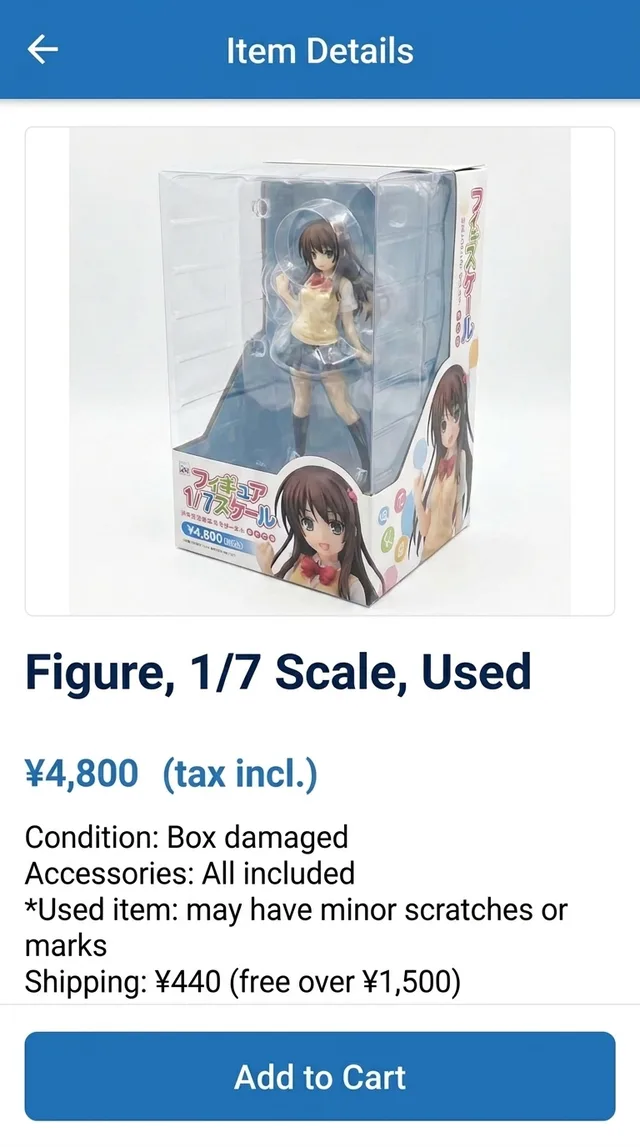
A used figure listing in Japanese underneath, the same page in English in the floating window
One setting matters: choose Japanese as the source language instead of Auto. If detection guesses wrong, the text comes back untranslated. Text recognition happens on the phone and only the recognized text is sent for translation. There’s a longer explanation in translate your iPhone screen live.
Reading a Surugaya product page, line by line
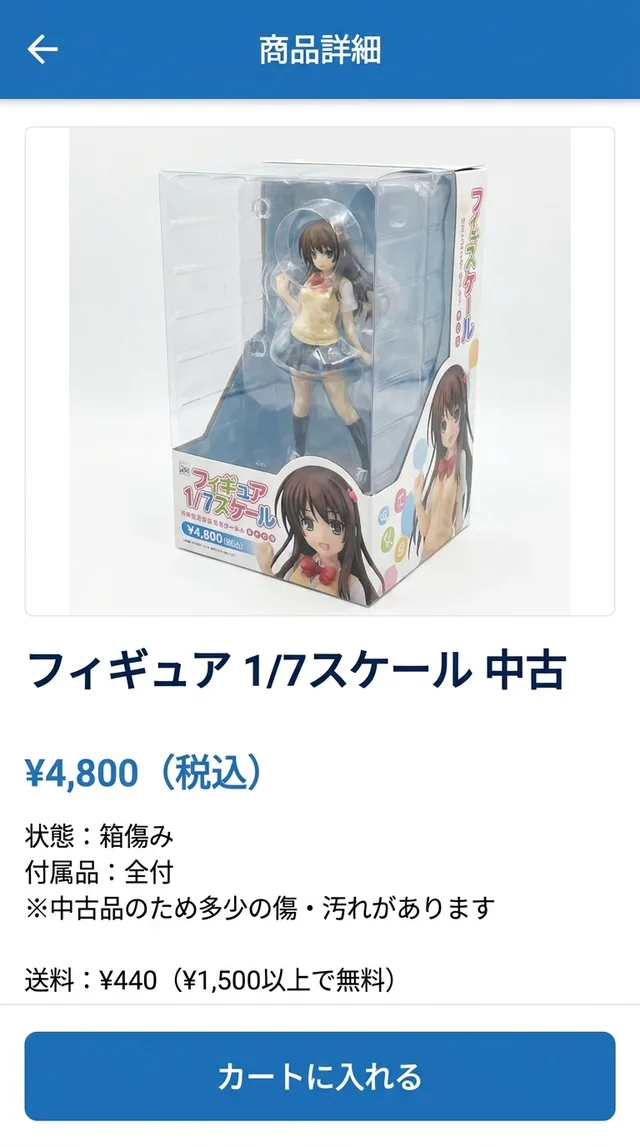
Take the example screen above, a used 1/7 scale figure:
- Price: ¥4,800 税込. 税込 means tax included, so that is the shelf price inside Japan. Currency conversion, proxy charges and international shipping come on top.
- 状態:箱傷み. Condition: the box is damaged or worn. For a display piece that’s often fine; for a collector who keeps things boxed, it’s the whole story.
- 付属品:全付. Accessories: everything included. This is the line to check on figures, where swappable faces, hands and bases go missing.
- The used-item note. Used listings often carry a general note that second-hand items may show wear such as scuffs or yellowing. Read it as a warning that photos may not show everything.
- Shipping: ¥440, free over ¥1,500. In this example that’s the domestic shipping line. Your real shipping depends on how the item leaves Japan, so treat any figure you see on a Japanese listing as domestic.
- カートに入れる. Add to cart.
The translation window renders all of this, but recognizing the key words by sight makes browsing faster.
The Japanese words that decide a Surugaya listing
| Japanese | What it means for you |
|---|---|
| 中古 / 新品 | Used / new |
| 状態 | Condition. Look here first on any used item |
| 箱傷み | Box damaged or worn. The item may be fine |
| 付属品 | Accessories, the parts that come with it |
| 全付 | All accessories included |
| 欠品 | Missing part(s). Check which one |
| 税込 | Tax included in the price |
| 品切れ / 在庫切れ | Sold out / out of stock |
Two more you’ll meet: 送料 is the shipping fee, and 予約 means a pre-order, which ties up your money and your proxy’s storage until the release date.
Surugaya shipping and proxies: how to buy from Surugaya
Translation doesn’t solve delivery. Whether you can pay with an overseas card and ship abroad directly depends on Surugaya’s current policy, so start with its help pages. If direct international shipping isn’t available for your country or your item, the usual routes are:
- A Surugaya proxy. A company in Japan buys the item on your behalf, receives it and ships it to you. Confirm your proxy supports Surugaya links before you commit.
- A package forwarder. Useful only if Surugaya accepts your payment method and a Japanese forwarding address for your order.
Either way, the reading comes first: check 状態, 付属品 and the used-item note on the original page, then paste the link into the proxy. Money is involved at every step, so treat the translation as help understanding the screen and confirm the final total, fees and shipping costs at checkout yourself.
Honest limits
- The translation trails the screen by a second or two. Scroll, pause, read.
- Tiny text in product photos and decorative fonts in banners are weak spots. Zoom in first.
- It reads; it doesn’t write. Questions to the store or proxy still need composing separately.
- The app is free to download; unlimited translation requires a Pro subscription.
The same session works on every Japanese screen on your phone. For secondhand marketplaces see Mercari Japan in English, and for everything else, Japanese apps in English on iPhone.
PiP Translate is on the App Store. Read the condition line yourself, then decide how to buy it.
FAQ
Does Surugaya have an English version?
Surugaya's site and app are written in Japanese. How it serves overseas buyers has changed over time, so check Surugaya's own help and FAQ pages for the current situation. Proxy services often show Surugaya items with machine-translated text, but condition notes and details inside images may still be in Japanese.
Can I buy from Surugaya from outside Japan?
It depends on Surugaya's current policy, which has changed more than once. Some buyers order directly, others go through a proxy or a package forwarder. Check Surugaya's help pages, and your proxy's list of supported stores, before you plan an order.
How do I translate Surugaya on iPhone?
On the website, Safari's page translation handles real text. For the app, images and anything Safari misses, a screen translator such as PiP Translate shows the same screen in English in a floating Picture in Picture window while you browse. Set Japanese as the source language rather than Auto.
What does 箱傷み mean on Surugaya?
箱傷み means the box is damaged or worn. It describes the packaging, not the item itself, which matters a lot for collectors who care about boxed condition.