Japanese Apps in English on iPhone: What Tabelog, Suica and PayPay Offer, and How to Read the Rest
Japan builds its apps for people who read Japanese. Whether you’re visiting for two weeks or carrying a residence card, sooner or later you need a restaurant booking, a train card top-up or a haircut from an app that has never heard of a language toggle.
Getting Japanese apps in English on iPhone is a two-step job. First, find out what the app already offers officially; several big ones have more English than their reputation suggests. Second, have a way to read whatever is left over. This guide covers both, with specifics for Tabelog, Suica and PayPay.
Step one: look for an official English mode
Three checks, in this order:
- iPhone language. Many Japanese apps have no in-app switch; they follow the phone. If your iPhone is already in English and the app isn’t, open the app’s entry in iOS Settings and look for a Language row. It only appears when the app ships more than one language, so its absence is an answer too.
- Inside the app. Look for a globe icon, or 言語 (language) under 設定 (settings).
- The website. Some services have an English web version the app lacks, and Safari can translate ordinary web pages.
Roughly what you’ll find (apps change, so treat this as a starting point):
| App | Official English | What stays Japanese |
|---|---|---|
| LINE | Menus follow your phone language | Everything people and businesses send you |
| PayPay | Main screens | Campaigns, terms, many linked pages |
| Tabelog | English version of the site | Most user reviews |
| Suica | The card in Apple Wallet | JR East’s own Suica app |
| HotPepper Beauty, Demae-can, Jalan | None that we’ve found | All of it |
The pattern: the frame gets translated, the content doesn’t. Buttons can be in English while every coupon, review and message is still written for Japanese readers.
Tabelog English: the listings, not the opinions
Tabelog is the restaurant site locals actually trust. Scores run lower than you’re used to; a place in the mid-3s is usually well regarded, not mediocre.
There is an official Tabelog English version on the web (use the language menu on the site). Names, addresses, hours, cuisine types and budget ranges come through, and some restaurants can be booked online.
What it doesn’t solve: the long reviews that make Tabelog worth using are written in Japanese by locals. Features and booking conditions can also differ between the English and Japanese versions, so compare both before you reserve. Searching for a specific restaurant works better with its Japanese name, copied from a maps app.
Suica app English: you may not need the app
Most travelers don’t. A Suica card can be created directly in Apple Wallet: tap the plus button, choose Transit Card, pick Suica, and load it with a card from Apple Pay. The whole flow is in your iPhone’s language. Top-ups depend on your card issuer; if one card is refused, try another.
JR East has also released a tourist-oriented app, Welcome Suica Mobile, with English support. Check the App Store for current availability.
The regular JR East Suica app is a different story. Residents need it for commuter passes and other account-level features, and in our experience it has been Japanese-only. Check the listing before assuming otherwise.
PayPay English: menus yes, fine print no
With your iPhone set to English, PayPay shows its main screens in English: pay, scan, balance, history.
The Japanese comes back one level deeper: cashback campaign rules, points terms, coupons, the mini-services inside the app, merchant names in your history.
PayPay is mostly a residents’ tool. Sign-up has generally needed a phone number that can receive SMS in Japan, though requirements change, so check PayPay’s own help pages. Visitors are usually better served by Suica in Wallet plus a credit card.
One rule for anything involving money: amounts are numbers, and numbers don’t need translating. Read the yen figure and the recipient on the original screen. Use a translation to understand what a screen is asking, never as the only basis for confirming a payment or a bank transfer.
The apps with no English at all
This is where people living in Japan get stuck:
- HotPepper Beauty for salons, with menus and coupons entirely in Japanese.
- Demae-can for delivery.
- Jalan for ryokan and small inns that never appear on international booking sites.
- Ward office portals, garbage-sorting apps, Mynaportal and other government services, with partial English at best.
- Yahoo! disaster alerts. For emergencies specifically, install NERV Disaster Prevention or Safety Tips, which support English.
- Mercari, which has a partly English interface while every listing stays Japanese. That one has its own guide.
Apple’s built-in tools don’t help much here. Live Text and Safari translation need selectable text or a real web page, and a button inside a native app is neither. Screenshot-and-translate works, one screen at a time. Fine for a menu, tedious for a booking flow.
Reading Japanese apps in English without leaving them
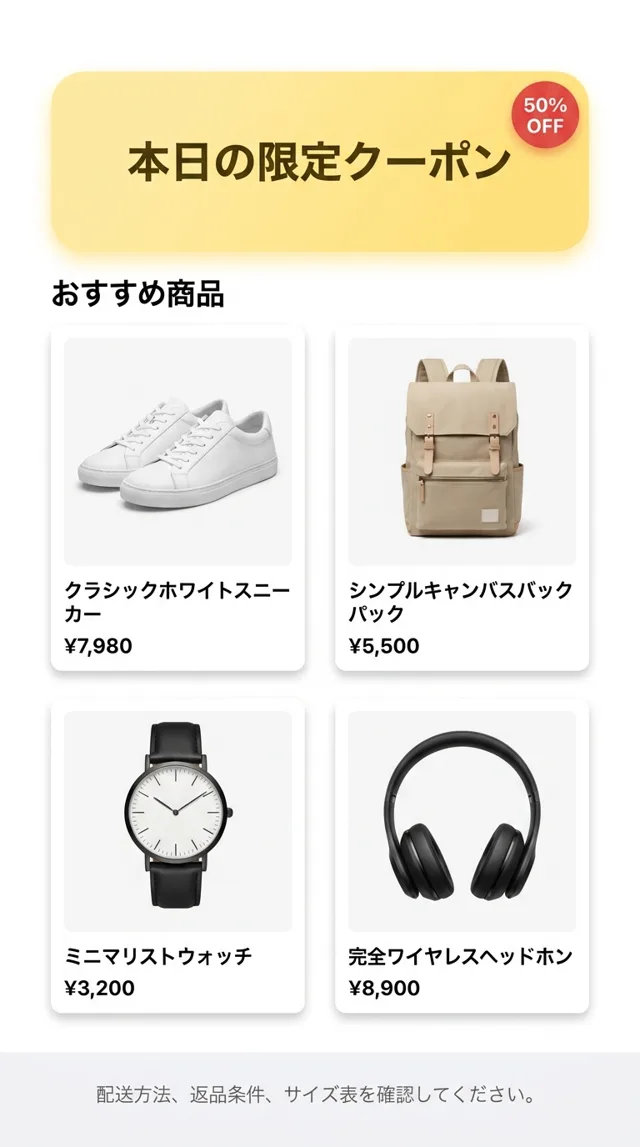
PiP Translate (App Store name: PiP Screen Translate) handles the leftover Japanese. You start an iOS screen broadcast from the app, switch to HotPepper or the Suica app, and a Picture in Picture window floats on top showing the same screen with the text in English. No screenshots, no app switching. Drag the window to any corner, pinch to resize it, or swipe it off the edge when it’s in the way.
 PiP Translate
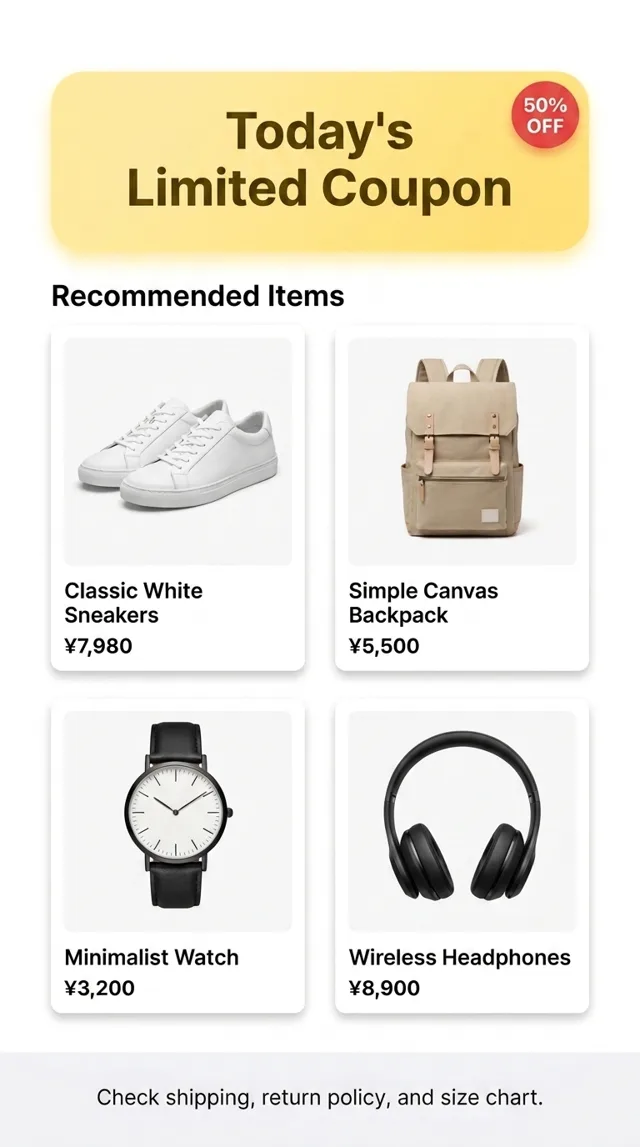
A Japanese app screen underneath, the same screen translated to English in the floating window
It isn’t tied to particular apps: anything visible on screen can be read. Set Japanese as the source language rather than leaving it on auto: a wrong guess comes back untranslated.
What to expect, honestly
- A short delay. The translation trails the screen by a second or two. Pause after scrolling.
- Small text is the weak spot. Zooming in helps. Handwriting and decorative fonts are unreliable.
- It reads, it doesn’t type. You still fill in the form yourself; the app underneath is not modified.
- Privacy. Text recognition runs on the phone; only the recognized text is sent to the cloud for translation. You can stop the broadcast before entering sensitive details.
- High-stakes text. For contracts, tax notices or bank transfers, treat it as a first pass and confirm with a person.
It’s free to download; unlimited translation needs a Pro subscription.
The same approach works for Korean apps, and there’s a broader explainer on translating your iPhone screen live.
For used games, anime goods and figures, see Surugaya in English, and for flea-market buying, Mercari Japan in English.
Get PiP Translate on the App Store and try it on the next Japanese app that has no English mode.