Mercari Japan in English: How to Read Japanese Listings on iPhone Before You Buy (Directly or Through a Proxy)
Most people searching for Mercari Japan in English are really asking two questions at once. Can I read this? And can I buy this? They have different answers, and mixing them up is how people end up with a “junk” camera they thought was tested, or a checkout screen they can’t get past.
Two separate problems: reading and buying
Reading is a language problem. Listings on Japanese marketplaces are written by Japanese sellers for Japanese buyers. Even where an app’s menus have some English, the title, the condition notes and the seller’s description are whatever the seller typed.
Buying is a logistics problem. Many Japanese marketplaces expect a Japanese phone number to register, a Japanese payment method, a Japanese delivery address, or all three. Plenty of sellers only ship domestically. This is what a Japanese proxy service solves: a company in Japan buys the item for you, receives it, and ships it abroad.
Translation does nothing for the second problem. No app will give you a Tokyo address. What translation does is make you a better buyer, whether you check out yourself or paste the link into a proxy’s order form. A proxy buys what you tell it to; it does not read the seller’s note about the scratch on the lens for you.
Where you’ll be shopping, and what each one expects
- Mercari Japan. The big flea market app, and where most collectors end up. Registration and checkout are built for people living in Japan, so overseas buyers generally go through one of the proxy partners.
- Yahoo Auctions Japan. English help is essentially absent here: the site is Japanese throughout, including bidding, seller Q&A and payment. Treat it as proxy territory, and do your own reading before you place a bid through one.
- Rakuten Ichiba. Rakuten Japan in English is a patchwork. Some shops ship overseas and some pages translate; many do neither. Product pages are famous for putting the whole description into long promotional images.
- Specialist shops. Suruga-ya and Mandarake for figures, games and manga; Booth for indie goods; Disk Union for records. A few have English storefronts, but the Japanese side usually shows more stock.
Mercari Japan in English: the options you already have
Safari’s page translation. Mercari, Yahoo Auctions and Rakuten all have websites. Open a listing in Safari, tap the page menu and choose Translate. Anything that is real text gets translated in place. Try this first; sometimes it’s enough.
The proxy’s own English site. Buyee and similar services mirror Mercari and Yahoo Auctions listings with machine-translated text. It’s convenient, but you are reading a copy, and the fine print in photos is still untranslated.
Screenshot and Google Lens or Live Text. Accurate for one screen. Slow for forty.
Where these run out: inside the Mercari Japan app itself, where nothing is selectable; on Rakuten’s image-based descriptions; and on photos of labels, tags and spec sheets that sellers upload instead of typing. Safari translates text, not pictures of text.
Float the translation over the app instead
PiP Translate (on the App Store as PiP Screen Translate) handles those cases. You start an iOS screen broadcast from the app, switch to Mercari or whatever you’re browsing, and a Picture in Picture window floats on top showing the same screen in English. Scroll the search grid, open a listing, check the seller’s ratings; the window follows along. Drag it to a corner, pinch to resize, or swipe it off the edge when it’s in the way.
 PiP Translate
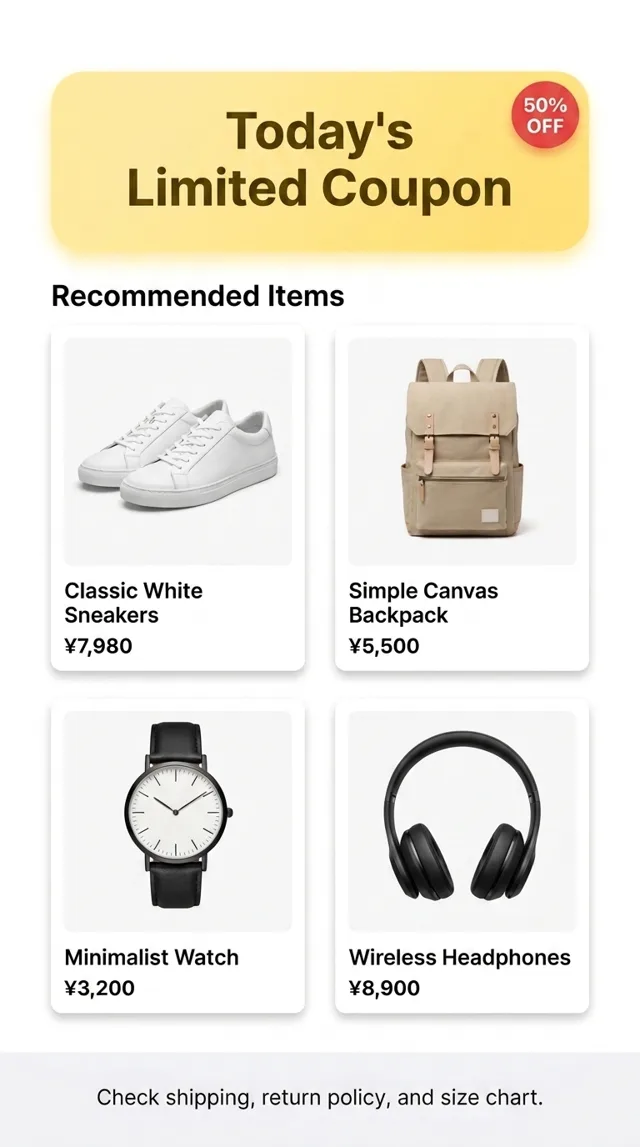
A Japanese shopping screen underneath, the same screen translated to English in the floating window
Text recognition happens on the phone, and only the recognized text goes to the cloud for translation. Because it reads whatever is visible, it doesn’t care whether the words are app UI, a web page or a promotional image. It’s free to download; unlimited translation needs a Pro subscription.
The limits are worth knowing. The translation trails the screen by a second or two. Tiny text in a seller’s photo, handwritten notes and decorative fonts are the weak spots, so zoom into the photo until the text is large. It reads; it doesn’t write. To message a seller you’ll still compose Japanese elsewhere, and a proxy will usually handle that contact anyway.
The words that decide whether a listing is a bargain
A translation window will render all of these, but they come up often enough that recognizing them by sight speeds up browsing. Mercari’s condition field is a fixed scale, which helps.
| Japanese | What it means for you |
|---|---|
| 新品、未使用 | New, unused. Top of Mercari’s scale |
| 目立った傷や汚れなし | No noticeable scratches or stains |
| 全体的に状態が悪い | Poor condition overall |
| ジャンク | Junk: sold as-is, often untested or for parts |
| 動作確認済み | Tested and working |
| 未開封 | Unopened |
| 箱なし | No box |
| 送料込み | Shipping (within Japan) included in the price |
| 着払い | Buyer pays shipping on delivery |
| ノークレーム・ノーリターン | No complaints, no returns. Common on Yahoo Auctions |
The dropdown grade is the seller’s summary. The description underneath is where they admit to the dent, the smoke smell or the missing cable. Read both, every time.
Buying through a proxy, and looking for a Buyee alternative
Buyee is the default because it is wired into Mercari and Yahoo Auctions, but it is not the only one. FromJapan, ZenMarket and Neokyo are the names that come up most when people look for a Buyee alternative. Fee structures differ, so compare item fees, consolidation, storage time and shipping methods for the kind of thing you actually buy.
Whichever you pick, the workflow is the same:
- Browse the original listing, translated, and read the full description and every photo.
- Check the seller’s rating count and recent feedback.
- Note who pays domestic shipping, since the proxy will pass that on.
- Paste the listing URL into the proxy and order.
A pure forwarding address only helps on stores that accept overseas cards and accounts. Where the marketplace wants a Japanese phone number, you need a full proxy.
The same setup for everything else in Japanese
The reason to buy from Japan is price and selection, and both depend on reading what the seller actually wrote. The translation session doesn’t care which app is in front, so it covers the rest of your phone too: see Japanese apps in English on iPhone, the general explanation of live screen translation, or the Chinese equivalent of this guide, Taobao in English.
For anime goods, games and figures, Surugaya in English walks through its condition grades and shipping screens.
PiP Translate is on the App Store. Read the listing properly first, then decide how to buy it.