Trendyol English on iPhone: Why the Language Switch Can Change the Shop, and How to Read the Turkish Store Instead
If you live in Turkey, Trendyol is hard to avoid: clothes, homeware, electronics, parcels that turn up in a day or two. If you don’t read Turkish, the first thing you search for is Trendyol English. There is an English option. The catch is where it takes you, and it’s worth understanding before you tap it.
Trendyol English: what the language switch actually changes
In our experience, and at the time of writing, choosing English in Trendyol does not simply relabel the Turkish shop. It tends to move you to Trendyol’s international store: a separate catalog aimed at shoppers outside Turkey, with its own prices, its own currency and a different product range. The jacket a colleague in Istanbul sent you may not be there, or may cost something else.
That is a sensible design for someone ordering from abroad. It is the wrong one for someone with an address in Izmir who wants local prices and domestic delivery. So a lot of foreigners living in Turkey who want Trendyol in English end up keeping the app in Turkish and reading around it.
Don’t take our word for it; check. Open one product, note the price and currency, switch the language, then look for the same product again. Apps change, and the setup may differ by account or region.
Check what English you already have
Before adding anything, run three quick checks:
- The app’s own language setting. It’s in the account area. Use it to see which store you land in, not only which language.
- The iOS per-app language. Open Settings, find Trendyol in the Apps list and look for a Language row. It only appears when the app ships several languages and your iPhone has more than one preferred language.
- The website in Safari. Where a product page is real text, Safari’s Translate option in the page menu turns it into English in place. It does nothing for size charts and descriptions uploaded as images, and most people shop in the app anyway.
Even in English, anything a person typed stays in that person’s language. On the Turkish store that means seller descriptions, buyer reviews and answers to product questions are Turkish.
Read the Turkish store in English with a floating window
When the setting doesn’t give you the shop you want, translate the screen instead. PiP Translate (App Store name: PiP Screen Translate) works like this: you start an iOS screen broadcast from the app, switch to Trendyol, and a separate Picture in Picture window floats above it showing the same screen in English. Scroll a category, open a product, read the reviews; the window keeps up. Drag it to a corner, pinch to resize it, or swipe it off the edge when it’s covering the button you need.
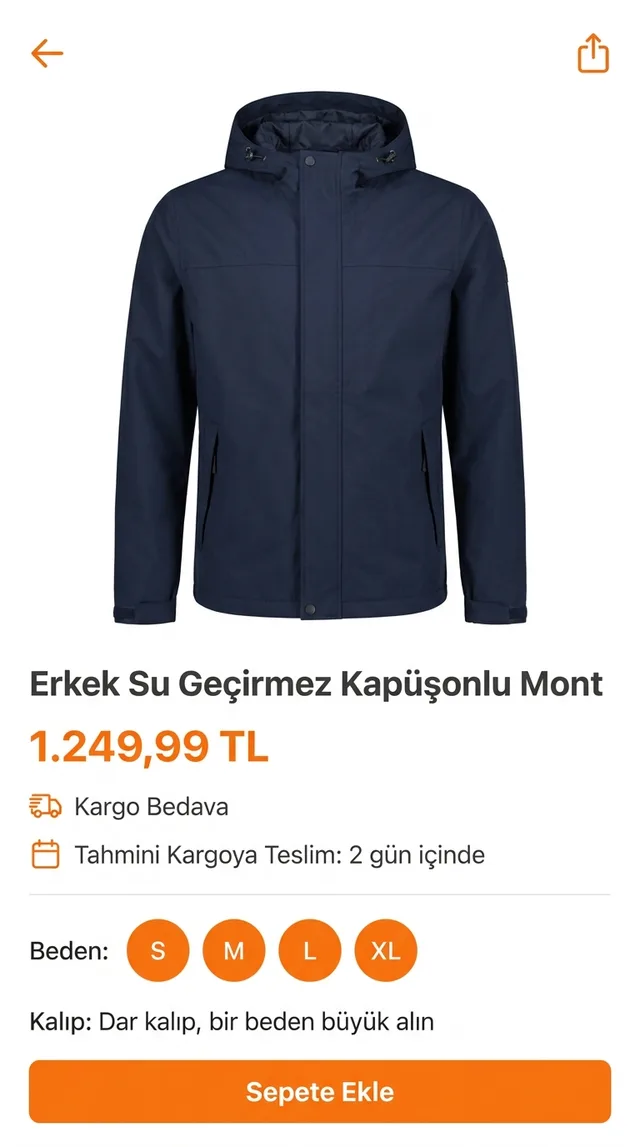
 PiP Translate
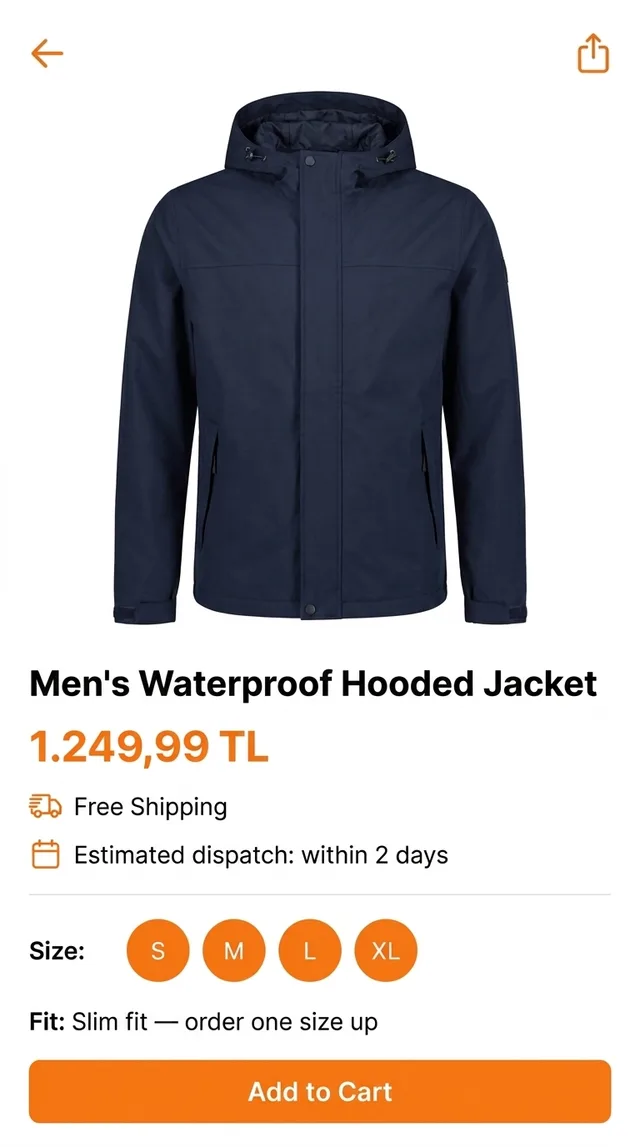
A Turkish product page underneath, the same page in English in the floating window
The app underneath doesn’t change. You’re still in the Turkish store, with Turkish prices, tapping the Turkish buttons; the window just tells you what they say. Text recognition happens on the phone and only the recognised text goes to the cloud for translation.
One setup step matters: pick Turkish as the source language rather than Auto. If auto-detect guesses wrong, the text comes back untranslated. More on how this works in translate your iPhone screen live.
Reading a Trendyol product page, line by line
Take the jacket in the figure. Top to bottom:
- 1.249,99 TL. Turkish number format uses a dot for thousands and a comma for decimals, so this is one thousand two hundred and forty-nine lira and 99 kuruş, not one lira and change.
- Kargo Bedava. Free shipping.
- Tahmini Kargoya Teslim: 2 gün içinde. Estimated handover to the courier within two days. It’s when the seller ships, not when the parcel reaches you.
- Beden: S M L XL. The size selector.
- Kalıp: Dar kalıp, bir beden büyük alın. Slim cut; order one size up. This line decides whether you keep the jacket or start a return, so read it before picking a size. Kalıp literally means a mould or template, which is why a translation sometimes renders it oddly; on clothes it means the cut.
- Sepete Ekle. Add to basket.
Then scroll down. Trendyol is a marketplace, so check who the seller is, and read the reviews, where buyers often say whether the size ran small or large.
Trendyol jargon, in plain English
The floating window translates these, but they come up on almost every screen, so recognising them saves time.
| Turkish | What it means |
|---|---|
| Sepete Ekle | Add to basket |
| Kargo Bedava | Free shipping |
| Beden | Size |
| Kalıp: dar / normal / geniş | Cut or fit: slim / regular / loose |
| İade | Return (and the refund that follows) |
| Kapıda Ödeme | Pay on delivery at the door, where offered |
| Satıcı | Seller; products come from different sellers on the marketplace |
| Değerlendirme | Review or rating |
Sahibinden and other Turkish shopping apps
The same approach covers the rest of the Turkish shopping apps on your phone. Sahibinden, the big classifieds app for cars, flats and second-hand goods, is the one foreign residents usually meet next, typically while flat hunting. We’re not aware of an English setting in the app, so run the checks above and then translate. The name means “from the owner”, and flat listings use the Turkish room notation: 2+1 is two bedrooms plus a living room.
For a flat or a car, a translation helps you shortlist. It is not how you should read a rental contract or decide on a deposit; have the actual documents checked by someone who reads Turkish properly.
The same goes for Hepsiburada, n11 and your food-delivery app: check the settings first, then translate what’s left. If you also shop across other markets, there are companion guides for Allegro in English and Taobao in English.
Honest limits, and a word on payments
- The translation trails the screen by a second or two. Scroll, pause, read.
- Size charts uploaded as small images come out better if you zoom in first. Stylised fonts on banners are a weak spot.
- It reads; it doesn’t write. Questions to a seller you compose yourself.
- Some banking and card-verification screens go blank while the screen is being captured, and then there’s nothing to translate.
- It’s free to download; unlimited translation needs a Pro subscription.
On money: a translated checkout helps you understand the screen. Before you pay, confirm the amount, the currency and any instalment option yourself, and for return or refund rules, check Trendyol’s own help pages or ask your bank. Don’t treat a machine translation as the final word on anything you’re charged for.
PiP Translate is on the App Store. Keep Trendyol in Turkish, keep the local catalog, and read it in English.
FAQ
Does Trendyol have an English version?
Yes, Trendyol offers English. In our experience, at the time of writing, the English option is tied to its international shop, which can have different prices, currency and products from the Turkish store. Compare the price and currency of one item before and after switching to see which shop you are in.
Can I use the Turkish Trendyol store as a foreigner living in Turkey?
If you live in Turkey, the Turkish store is the one with local prices and domestic delivery, and the main obstacle is that it is in Turkish. Many foreign residents keep the app in Turkish and translate the screen instead. Account and payment requirements can change, so check them in the app itself.
How do I translate Trendyol on iPhone?
Safari's page translation works on pages of the website. Inside the app, a screen translator such as PiP Translate shows the same screen in English in a floating Picture in Picture window while you keep browsing the Turkish store. Set Turkish as the source language rather than Auto.
What does 'Dar kalıp, bir beden büyük alın' mean on Trendyol?
It means the item has a slim (narrow) cut and the seller suggests ordering one size larger than usual.