Xiaohongshu in English: How to Use RedNote on iPhone to Plan a China Trip, Find Cafés and Read the Comments
Ask anyone who has been to China recently where to eat in Shanghai, and the answer is usually “search it on Xiaohongshu”. So you install it, look for an English switch, and find that Xiaohongshu English is real but partial. The menus are workable. The thing you came for, a note saying which café is worth the queue, is a Chinese photo carousel with Chinese hashtags and three hundred Chinese comments underneath.
This guide covers what the app translates for you, what it doesn’t, and how to use RedNote to plan a trip and then act on what you read.
Xiaohongshu English: what’s there and what isn’t
Xiaohongshu, listed as RedNote in many App Store regions, picked up a wave of international users in early 2025 and responded with more English support. At the time of writing, that includes English interface elements and a translate option on many posts and comments. Check your profile settings and the app’s language options first, because this changes between versions.
So RedNote English is not a myth, and the RedNote translate option is worth tapping first. The gap is the content itself:
- Text baked into images. Most notes are carousels: a cover card with a bold Chinese headline, then slides with prices, addresses and tips written on the pictures. The Xiaohongshu translate button works on text, not on pictures of text.
- Hashtags and slang. Tags like #上海咖啡 and shorthand like 人均 or 避雷 come out oddly, or not at all.
- Comment threads. Where the real information often lives: “is it still open?”, “which exit?”, “went yesterday, 40-minute wait”.
- Shop and product pages. Specs, size charts and promo banners are often images too.
How to use Xiaohongshu when the note is a picture
When the translate button runs out, translate the screen instead. PiP Translate (App Store name: PiP Screen Translate) works like this: you start an iOS screen broadcast from the app, switch to Xiaohongshu, and a Picture in Picture window floats on top showing the same screen with the text in English. It includes the words on cover cards, carousel slides and comment bubbles, because it reads whatever is visible rather than the app’s text layer.
Swipe through a carousel and the window follows, trailing by a second or two. Drag it to a corner, pinch to resize it, or swipe it off the edge when it covers something. The app underneath is untouched; you still tap the Chinese buttons yourself.
Set Chinese as the source language rather than Auto. A wrong guess on a note mixing Chinese, English brand names and emoji can return the text untranslated.

 PiP Translate
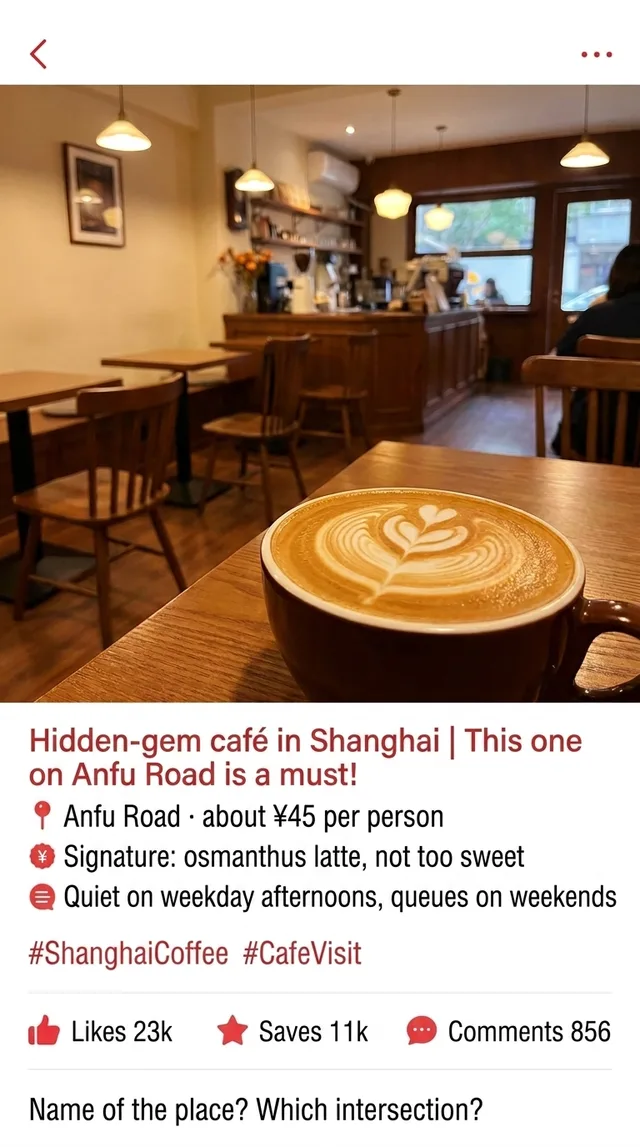
A Chinese note about a Shanghai coffee shop underneath, the same note in English in the floating window, down to the comment asking which intersection it's on
Text recognition runs on the phone, and only the recognized text is sent for translation. It’s free to download; unlimited translation needs a Pro subscription.
Planning a China trip with RedNote: guides, cafés and queues
The most useful notes for a visitor fall into three kinds.
Itineraries. Search a city plus 攻略 (guide) and you get day-by-day plans as image carousels: which metro line, what to book ahead, which viewpoint is overrated. Read the whole carousel, not just the cover. The last slide is often the practical one.
Shop visits. 探店 notes are someone visiting a café, restaurant or shop and reviewing it. Look for 人均 (average spend per person), opening hours, and remarks about queues or reservations. A note saying weekday afternoons are quiet and weekends have a line is worth more than any star rating.
Warnings. 避雷 means “avoid this”. People post them about tourist-trap restaurants, bad hotels and overpriced shops. They’re worth reading before you commit to a plan.
Then open the comments. Saves and likes show that a note was popular; the comments show whether it’s still accurate. Scroll them with the floating window open and look for recent replies about closures, price changes or the exact entrance.
From note to map, Dianping and Taobao
Reading the note is half the job. To act on it:
- Get the name in Chinese. Maps and booking apps in China search best with the original name, and the floating window only reads; it won’t type anything for you. Where the app won’t let you select text, screenshot the note and use iOS Live Text to copy the Chinese shop name.
- Find it on a map. Paste the Chinese name into your map app along with the district. The comment asking which intersection it’s at, and the answer, often saves you a wrong turn.
- Cross-check on Dianping. Notes are personal and sometimes sponsored. Dianping has more reviews, current hours and set menus; see Dianping and Meituan in English.
- Buy the product. When a note makes you want something and people in the comments write 求链接 (asking for the link), the item usually ends up on a shopping app. Taobao in English covers reading those listings.
When money is involved, whether that’s a purchase, a deposit or a booking, the translation helps you understand the screen. Check the amount, size and cancellation terms yourself before you pay.
Xiaohongshu slang you’ll see in every note
A translation will turn these into something, but recognizing them speeds up browsing:
| Chinese | What it means |
|---|---|
| 笔记 | A note: Xiaohongshu’s word for a post |
| 攻略 | Guide or itinerary |
| 探店 | Visiting a shop or restaurant to review it |
| 人均 | Average spend per person |
| 种草 | ”Planting grass”: the note made you want it |
| 拔草 | Used both ways: finally buying or visiting the thing, or being put off it. Read the context |
| 避雷 | Warning: avoid this |
| 求链接 | Asking for the product link |
拔草 trips up machine translation most, because the same word can mean “I finally went and it was great” or “this note cured me of wanting it”.
Limits worth knowing
- The window trails the screen by one to two seconds. Swipe, pause, read.
- Stylized fonts on cover cards and handwritten captions are weaker than plain text. Tap into the image so the text is larger.
- It reads text on the screen, not the audio. Video notes with on-screen captions get translated as the captions appear, but spoken Chinese does not.
- It reads; it doesn’t write. Comments, replies and searches are still yours to type.
- Protected video shows as a black frame, and some payment screens block capture entirely.
The rest of your China phone
Xiaohongshu is usually the first Chinese app a traveller installs, not the last. The same broadcast covers the others, since the floating window doesn’t care which app is in front. For payments, transport and the rest, start with the Chinese apps survival guide.
PiP Translate is on the App Store. Find the café on Xiaohongshu, read the comments in English, then go before the weekend queue.
FAQ
Does Xiaohongshu have an English version?
Partly. Since its international surge in early 2025, the app (called RedNote in many App Store regions) has added English interface elements and, at the time of writing, a translate option on many posts and comments. The notes themselves are still mostly Chinese, and text inside images is not covered by that button, so check the app's settings first and expect Chinese in the content.
Can I use RedNote from outside China as a foreigner?
At the time of writing it is on the App Store in many countries, and plenty of travellers use it to research trips before they arrive. Sign-up steps and regional availability can change, so follow the app's current prompts rather than older guides.
How do I translate Xiaohongshu on iPhone, including text in pictures?
Use the in-app translate option where it appears. For cover cards, carousels and anything else baked into images, a screen translator such as PiP Screen Translate shows the whole screen in English in a floating Picture in Picture window while you scroll the app underneath. Set Chinese as the source language rather than Auto.
Can I use Xiaohongshu English to shop or book things?
You can read product notes and shop pages in English, but check prices, sizes and any payment step yourself. Translation helps you understand the screen; it does not make the purchase decision for you.